Digital safety onboarding process: a step-by-step guide
- jemmarenshaw
- Jun 18
- 8 min read
A digital safety onboarding process is the series of deliberate actions organisations take to equip new hires with essential cybersecurity knowledge, tools, and permissions before and during their early employment. Get it wrong and you leave accounts exposed, create compliance gaps, and set a culture where security feels like an afterthought. Get it right and you reduce human error from day one, build genuine digital security awareness, and give people the confidence to work safely without constant hand-holding. This guide walks you through every stage, from pre-boarding preparation to ongoing culture building.
What does a digital safety onboarding process actually require?
The digital safety onboarding process starts well before a new person walks through the door. Security onboarding begins before day one, with access provisioned strictly according to the least privilege principle. That means each account gets only the permissions the role genuinely needs, and nothing inherited from a predecessor who may have accumulated far more access than was appropriate.
Before the first login, you need four things in place.
Role-based access control (RBAC): Map each role to a defined permission set. Review it before provisioning, not after.
Authenticator apps: Microsoft Authenticator and Google Authenticator are the two most widely deployed options. Both support time-based one-time passwords and push notifications.
Password managers: Tools like 1Password or Bitwarden give staff a practical reason to use strong, unique credentials without the cognitive load of memorising them.
Endpoint protection software: Antivirus, disk encryption, and device management software should be pre-installed before hardware handover.
Digital policy acknowledgement also belongs in this phase. Tracking policy reads and signatures through an information security management system (ISMS) tool keeps compliance auditable and policies current. Paper sign-offs get lost. Digital records do not.
Tool Category | Example Tools | When to Deploy |
Authenticator app | Microsoft Authenticator, Google Authenticator | Before first login |
Password manager | 1Password, Bitwarden | Day one setup |
Endpoint protection | CrowdStrike, Microsoft Defender | Pre-loaded on hardware |
Policy acknowledgement | ISMS Lite, Confluence | Pre-boarding through week one |
VPN client | Cisco AnyConnect, Tailscale | Hardware handover |
Pro Tip: Pre-provision accounts at least 48 hours before the start date. Last-minute account creation under time pressure is where access controls get skipped.
How do you execute cybersecurity onboarding steps from day zero?
The first five days carry disproportionate weight. MFA must be configured before the employee’s first system login to avoid a vulnerability window where an account exists but lacks a second layer of protection. Walk through the authenticator setup in person or on a live call. Do not send instructions and hope for the best. Misconfiguration is common and the consequences are serious.
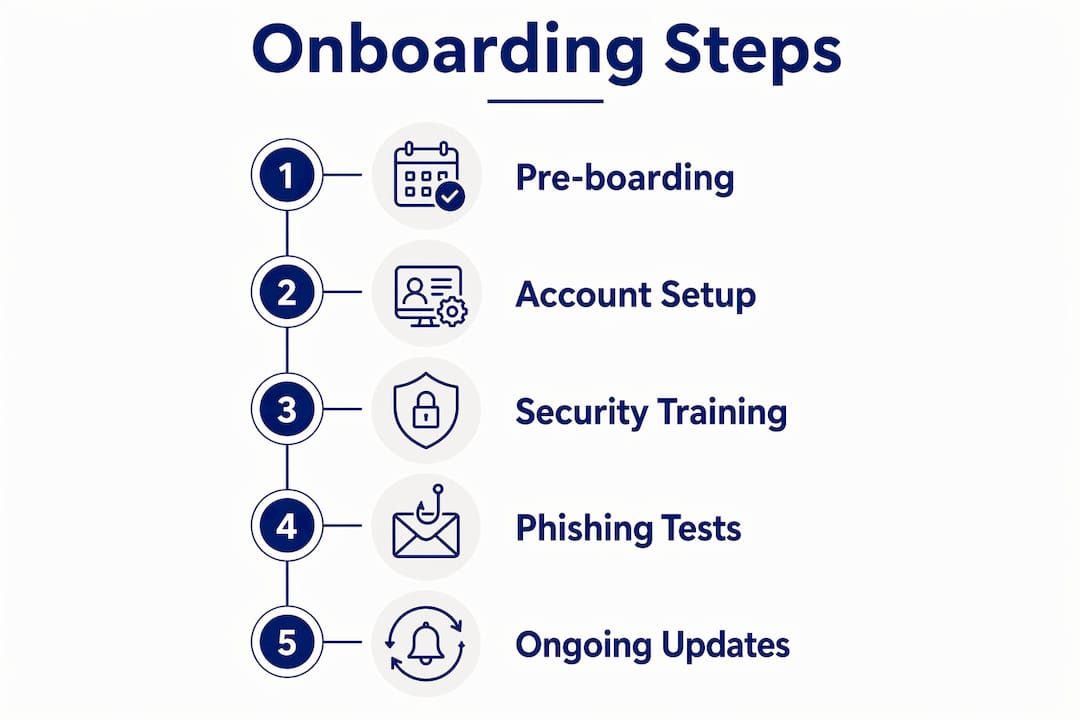
Here is a practical sequence that works for most organisations.
Pre-day-one (48 hours before start): Provision accounts with RBAC applied. Install endpoint protection and encrypt the device. Send the new person their login credentials through a secure channel, not plain email.
Day one, first 30 minutes: Complete MFA setup together, in person or via video call. Confirm the authenticator app is working before the person accesses any system.
Hardware handover (day one): Use this moment deliberately. Explaining VPN, endpoint protection, and disk encryption at handover reduces the likelihood of someone disabling critical security tools later. People are far less likely to turn off something they understand.
Day one, first session: Run a live security orientation. Keep it under 45 minutes. Cover phishing recognition, password hygiene, acceptable use policy, and incident reporting. Use real examples, not hypothetical ones.
Days 2–5: Role-specific policy acknowledgement through your ISMS tool. Confirm the person has read and signed off on the policies relevant to their function.
Week two onward: Begin role-specific training modules. A finance team member needs different threat awareness than a developer or a customer service rep.
Days 8–30: Spread detailed security training across weeks with role-specific content. This approach consistently outperforms cramming everything into day one. Retention improves significantly when people encounter information in context, as they are actually doing the work.
Mock phishing exercises and no-blame policies belong in this 30-day window. They build the habit of reporting suspicious activity quickly, without fear of embarrassment. That habit is worth more than any policy document.
Pro Tip: Record your live security orientation session. New starters who miss it due to travel or illness can watch it within their first week, and you maintain consistency across cohorts.

What common pitfalls undermine employee safety onboarding?
The most common mistake is treating security onboarding as a single event. Cramming security training on day one leads to poor retention. People are already absorbing payroll systems, team introductions, and workplace culture. Security information delivered in that context competes with everything else and loses.
Here are the pitfalls that consistently derail online safety training programmes.
Skipping or delaying MFA setup: An account without MFA is genuinely vulnerable. Every day it goes unconfigured is a day of unnecessary exposure.
Sending policy documents without confirmation: Emailing a PDF and assuming it has been read is not compliance. It is wishful thinking.
Framing security as IT’s problem: When security is presented as a technical burden rather than a shared responsibility, people disengage. They find workarounds. They use personal email for work files. They disable VPNs because they slow things down.
No feedback mechanism: If a new starter finds a security tool confusing or disruptive, and there is nowhere to raise that, they will quietly work around it.
“Employees are more likely to bypass security if tools are seen as annoying chores rather than natural workflow aids.” Framing security as a helpful workflow component prevents shadow IT and unsafe shortcuts.
Monitoring and verification matter here too. Compliance is not self-reporting. Use your ISMS tool to confirm policy acknowledgements, track training module completions, and flag accounts where MFA has not been activated. Build these checks into your HR and IT coordination process, not as an afterthought.
How do you build a security-first culture beyond initial training?
A single onboarding programme, no matter how well designed, does not create a security culture on its own. Culture is what people do when no one is watching. It is built through repetition, relevance, and genuine leadership commitment.
Embedding security smoothly into daily work processes prevents the resistance and risky shortcuts that undermine even the best initial training. The goal is for security to feel like a natural part of how work gets done, not a separate obligation layered on top.
Practical steps for sustaining digital security awareness after onboarding:
Quarterly refresher training: Threat landscapes shift. Phishing techniques that were novel 18 months ago are now standard. Keep training current.
Policy review cycles: Policies should be reviewed at least annually, with digital acknowledgement required from all staff when updates are made.
Feedback loops: Ask staff regularly whether security tools are creating friction. Technostress is real, and unaddressed frustration leads to workarounds.
Cross-team coordination: HR, IT, and compliance need a shared process. When these teams operate in silos, new starters fall through the gaps.
Leadership modelling: When managers visibly follow security protocols, it signals that these are genuine expectations, not just compliance theatre.
Pro Tip: Create a simple monthly security update, two to three minutes long, covering one current threat and one reminder about an existing control. Consistency beats intensity every time.
For schools and community organisations, the same principles apply with adjusted context. Cybercompassconsulting works with school communities on exactly this kind of sustained, culture-building approach to digital safety education.
Key takeaways
A well-structured digital safety onboarding process, built on pre-boarding preparation, staged training, and continuous culture reinforcement, is the most reliable way to reduce human error and build lasting cybersecurity resilience.
Point | Details |
Start before day one | Provision accounts with least privilege access at least 48 hours before the start date. |
MFA before first login | Configure multi-factor authentication before any system access to close the vulnerability window. |
Spread training over 30 days | Role-specific modules across the first month outperform single-day information overload. |
Frame security as workflow | Employees who understand why tools exist are far less likely to disable or bypass them. |
Sustain with feedback loops | Ongoing refresher training and staff feedback prevent culture drift and risky workarounds. |
Why i think most onboarding programmes miss the point
After working in cyber wellness for over three decades, the pattern I see most often is organisations treating security onboarding as a compliance checkbox. Tick the box, file the form, move on. The problem is that compliance and genuine behaviour change are not the same thing. Not even close.
What actually works is starting the conversation before day one. When someone receives their laptop and it already has endpoint protection installed, when their MFA is set up in a live call rather than a confusing email chain, when the person handing over the hardware takes five minutes to explain why disk encryption matters, something shifts. The new person feels looked after rather than processed. That feeling matters more than most security professionals admit.
I have also seen how the “no-blame” culture around phishing tests changes everything. When people know they can report a mistake without being made to feel foolish, they report faster. And fast reporting is the difference between a contained incident and a serious breach.
The other thing I would push back on is the idea that security training is IT’s job. The most resilient organisations I have worked with treat digital safety as a shared responsibility, owned by HR, leadership, and every team member. When a manager models good password hygiene, when a team leader asks in a meeting whether everyone has completed their training module, security becomes part of the culture rather than a foreign imposition.
The how-to-train-for-digital-safety question has a straightforward answer: make it human, make it relevant, and make it continuous. Everything else follows from that.
— Jemma
How Cybercompassconsulting can support your onboarding programme
Building a security-first culture from day one takes more than a checklist. It takes a programme designed around how people actually think, learn, and behave under pressure.
Cybercompassconsulting brings over 35 years of experience in cyber wellness to organisations that want more than compliance. Whether you are an SME setting up your first structured employee safety onboarding process, or a corporate team looking to build a cyber wellness plan that sustains security culture long after the first month, the team can help you design something that actually works. You can also book a consultation to discuss your specific needs and get a programme tailored to your organisation’s size, risk profile, and culture.
FAQ
What is a digital safety onboarding process?
A digital safety onboarding process is the structured series of steps an organisation takes to give new employees secure access, essential security tools, and cybersecurity awareness training from before their start date through their first 30 days.
When should MFA be set up during onboarding?
MFA must be configured before the employee’s first system login. An account without MFA active is vulnerable, and every day it goes unconfigured represents unnecessary risk.
How long should the initial security training session be?
The first live security orientation should run under 45 minutes, covering phishing, password hygiene, and incident reporting. Detailed, role-specific modules should then be spread across the following 30 days to improve retention.
Why do employees bypass security tools?
Employees bypass security tools when those tools feel like obstacles rather than aids. Framing security controls as helpful workflow components, and explaining their purpose at hardware handover, significantly reduces the likelihood of workarounds.
How often should security training be refreshed after onboarding?
Refresher training should occur at least quarterly, with policy acknowledgement required whenever policies are updated. Consistent, incremental updates outperform annual all-day sessions for both retention and engagement.
Recommended
Comments