Digital Safety for Families: Why the Conversation Beats the App Every Time
- jemmarenshaw
- Jun 24
- 9 min read

Digital safety for families isn’t a product. It’s a layered habit - technical controls on every device your child touches, paired with the kind of open, low-drama communication that means they’ll actually tell you when something feels off. Neither half works without the other. Controls manage access. They can’t manage how your child feels when a stranger online says exactly the right thing at exactly the right moment to make them feel understood. That’s the gap communication has to fill.
What is digital safety for families and why does it matter?
Digital safety for families is defined as the proactive, layered protection of children’s online activities using both technical safeguards and trusted family communication. The word “proactive” matters here. Reactive responses, checking a device after something has already gone wrong, are far less effective than building a culture of safety before problems arise.

Technical tools manage what children can access and for how long. But they cannot manage how a child feels when a stranger online says exactly the right thing to make them feel understood. That is where communication comes in. The two work together, and neither is sufficient on its own.
Think of it like road safety. You put a seatbelt on your child (the technical control), but you also teach them to look both ways before crossing (the education and dialogue). One without the other leaves a gap. The same logic applies to safe online practices for families.
How should families implement parental controls across all devices?
Parental controls must be applied consistently across every device a child uses, including smartphones, tablets, gaming consoles, and laptops. The most common mistake I see isn’t “no controls.” It’s partial controls — locked-down phone, wide-open game console. Kids find the gap faster than parents close it.
The basics, across every device:
Screen time limits — when and for how long
Content filtering — blocking what’s age-inappropriate
App and purchase controls — no downloads or spending without approval
Communication monitoring — who can actually message or chat with your child
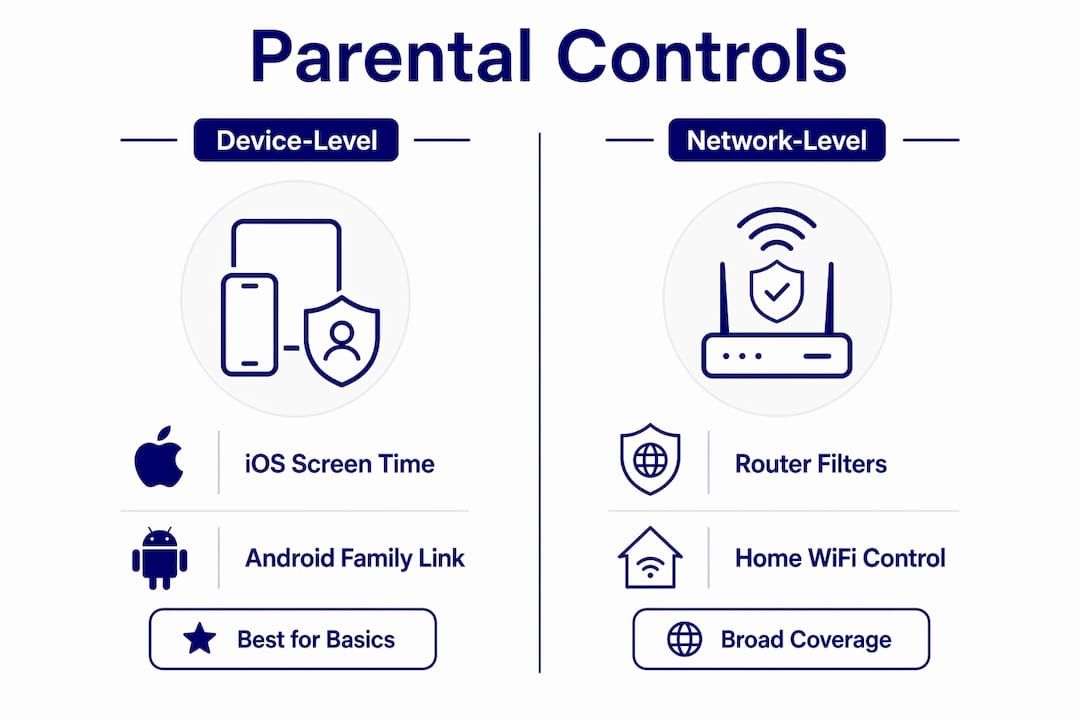
Tool type | Examples | Best used for |
Device-level controls | iOS Screen Time, Android Family Link, Nintendo Switch parental controls | Managing individual devices your child owns |
Network-level controls | Router parental gateways, Google Family WiFi | Filtering all home internet traffic across devices |
Third-party apps | Bark, Qustodio, Circle | Cross-device monitoring and content alerts |
Here’s the bit most parents never get told, and it’s worth sitting with: the internet your child uses every day wasn’t built with their wellbeing in mind. It was built to study behaviour and serve up whatever keeps attention longest. Ben Gillenwater - the Family IT Guy, (who spent decades in cybersecurity including time at the NSA before building his own son’s safety setup) puts it bluntly: the internet wasn’t built for the individual private user but for commerce, to figure out who you are and what you’ll respond to. Even an app with “Kids” in the name doesn’t change that underlying incentive.
And that’s exactly why router-level and account-level blocking (the approach I walk through in the COMPASS guide) matters more than people assume - it’s one of the few levers that works on the system, not just on willpower.
Pro tip: review your controls every six months. What’s right for a nine-year-old isn’t right for a thirteen-year-old.
Pro Tip: Review and update your parental controls every six months. What is appropriate for a nine-year-old is not appropriate for a thirteen-year-old, and the controls should reflect that shift in trust and maturity.
Why open communication matters as much as technical controls
Open communication and trust are the primary protective factors in family digital safety, more so than any single technical tool. A child who trusts their parent will report a problem. A child who fears punishment will hide it. That distinction can be the difference between a manageable situation and a crisis.
Building that trust does not require formal sit-down lectures. Simple daily questions about what apps they are using or who they are talking to online are far more effective. These “building blocks” conversations normalise the topic without making it feel like an interrogation.
Here is a practical framework for establishing family digital safety rules through dialogue:
Model the behaviour you expect. Parental digital conduct directly shapes how children treat privacy and device boundaries. If you scroll through your phone during dinner, you are teaching something.
Set a ‘no moving platforms’ rule. If a child is chatting with someone on a game or app and that person asks to move the conversation to a private message or different platform, the answer is always no. This rule is a primary defence against grooming tactics.
Schedule regular digital check-ins. Routine check-ins reduce shame and secrecy compared to surprise inspections. Frame them as digital maintenance, not punishment.
Agree on rules together. Children who help create the rules are more likely to follow them. Ask your child what they think is fair. You may be surprised by how reasonable they are.
Remove ambiguity. A clear family plan significantly reduces the risks that thrive in grey areas online. Vague expectations create loopholes.
Pro Tip: When a child comes to you with something uncomfortable they saw online, your first response sets the tone for every future conversation. Staying calm and saying “I’m glad you told me” is more important than whatever you say next.
“No moving platforms” is a significant protective rule you can give your child.
The warning signs of unsafe online interactions are often behavioural rather than technical. A child who becomes secretive about their device, withdraws from family, or seems anxious or upset after being online may be experiencing something harmful. These are the signals worth paying attention to.
Grooming tactics follow recognisable patterns. An adult will seek to isolate a child, build a sense of special connection, and gradually introduce inappropriate content or requests. The shift from a public platform to a private channel is a key escalation point, which is exactly why the ‘no moving platforms’ rule is so protective.
For scams and emotionally manipulative content, teach your child the “Pause, Screenshot, Ask” protocol. When something feels wrong or creates a strong emotional reaction, they pause before responding, take a screenshot, and ask a trusted adult. This simple three-step process prevents impulsive reactions that scammers and manipulators rely on.
Cyberbullying recognition requires knowing what to look for beyond the obvious. It includes being excluded from group chats, having private images shared without consent, and receiving a sustained pattern of negative comments. The response strategy matters as much as the recognition.
If you suspect your child has been targeted, do not delete anything. Preserve screenshots, document dates and times, and contact the relevant reporting channel. Acting quickly matters, but so does preserving the evidence.
Comparing safety tools and their real-world limitations
Understanding the difference between tool types helps families make better decisions about where to invest their energy. No single tool covers every risk.
Device-level controls, such as iOS Screen Time and Android Family Link, are the most accessible starting point. They are built into the operating system, free to use, and cover the most common risks for younger children. Nintendo Switch and PlayStation both offer dedicated parental control apps that manage game ratings, screen time, and communication settings.
Network-level controls work at the router level, filtering all traffic that passes through your home WiFi. These are useful for covering smart TVs, gaming consoles, and any device that connects to your network. The limitation is that they stop working the moment a child switches to mobile data.
Some social media platforms now offer supervision tools that require teen opt-in, emphasising transparency over covert monitoring. Meta’s Family Centre and TikTok’s Family Pairing are examples. These tools are designed for teenagers who are old enough to be aware they are being supervised, which builds honesty rather than resentment.
The most important limitation to understand is this: stealth-mode monitoring apps that operate without a child’s knowledge often damage trust more than they protect safety. They are generally discouraged except in rare, high-risk situations. Transparency about monitoring is almost always the better approach.
Managing adolescent digital safety requires gradually reducing technical controls while increasing education and open discussion. The goal is not to monitor your child forever. The goal is to build the critical thinking skills they need to protect themselves. Media literacy education is the ultimate safety layer, and it is the one that travels with them everywhere.
You can find additional strategies for managing device use in educational settings through resources like reducing phone use in schools, which offers practical approaches relevant to both parents and educators.
Key takeaways
Family digital safety requires both technical controls and open communication working together, because neither is sufficient on its own.
Point | Details |
Apply controls to every device | Parental controls on one device mean nothing if another device is unprotected. |
Communication is the primary safeguard | A child who trusts you will report problems before they escalate. |
Use the ‘no moving platforms’ rule | Preventing platform switches is one of the most effective defences against grooming. |
Know the reporting channels | NCMEC CyberTipline and Know2Protect are the key resources for exploitation concerns. |
Reduce controls as children mature | Gradually replace restrictions with education and critical thinking skills for lasting protection. |
Why I believe the conversation is the most powerful tool you have
I have worked in cyber wellness for a long time, and the pattern I see most consistently is this: the families who struggle most are not the ones without parental controls. They are the ones where the child does not feel safe enough to say, “Something weird happened online today.”
Technical tools are genuinely useful. I recommend them without hesitation. But they create a false sense of security if they become a substitute for relationship. A determined teenager will find a workaround. A child who trusts their parent will not need to.
What I find most confronting about the current digital environment is how sophisticated the threats have become. Grooming is no longer clumsy. Scams are emotionally intelligent. Harmful content is algorithmically served to children who did not go looking for it. The tools we have are playing catch-up, and they always will be.
The families I see navigate this well share one quality: they talk about it regularly, without drama, as part of normal life. Not a big scary conversation once a year. A small, curious question most days. “What were you watching?” “Who’s that person in the game?” “Did anything weird happen online this week?” That consistency builds the kind of trust that actually protects a child.
You do not need to be a technology expert. You need to be present, curious, and genuinely interested in your child’s digital life. That is the greatest safeguard there is.
— Jemma
How Cyber Compass Consulting supports families with cyber wellness
Knowing what to do and actually doing it consistently are two different things. Cyber Compass Consulting works with families to build personalised cyber wellness plans that combine the right technical controls with the communication strategies that make them stick.
The approach at Cyber Compass Consulting draws on over 35 years of experience in cybersecurity and behavioural psychology. It is not a one-size-fits-all checklist. It is a plan built around your family’s specific devices, your children’s ages, and the conversations you are already having. If you are ready to move from worry to confidence, explore the cyber wellness plan designed specifically for families, or book a consultation to get started.
FAQ
What does digital safety for families actually include?
digital safety for families includes parental controls on all devices, clear household rules about online behaviour, open communication between parents and children, and education about recognising risks like grooming, scams, and cyberbullying. It is a combination of technical and relational strategies, not a single tool or conversation.
At what age should parents start using parental controls?
Parental controls are recommended from the moment a child first uses a connected device, regardless of age. The type and intensity of controls should be adjusted as children mature, gradually shifting toward education and critical thinking as teenagers develop more independence.
What is the ‘no moving platforms’ rule?
The ‘no moving platforms’ rule means that if someone asks your child to continue a conversation on a different app or private channel, the answer is always no. Cybersecurity experts identify this as a primary defence against grooming, because moving platforms is a key tactic used to isolate children from oversight.
What should I do if I suspect my child is being groomed online?
Do not delete any messages or content. Preserve screenshots, note dates and times, and report immediately to the NCMEC CyberTipline or Know2Protect Tip Line. Contact local authorities if you believe your child is in immediate danger.
How do I talk to my child about online safety without scaring them?
Use short, casual questions as part of daily conversation rather than formal lectures. Asking “what were you watching today?” or “anyone new in your game?” normalises the topic and builds the habit of openness without creating anxiety or shame.
Recommended
Comments