Safe internet use step by step: a guide for parents
Safe internet use is the practice of systematically applying protective measures to safeguard children from online risks and preserve their privacy and wellbeing. The risks are real and growing. Nearly 50% of consumers have experienced data breaches, and 1 in 4 have been victims of identity theft. That means your child’s data, and yours, is genuinely at risk every time someone connects without proper protections in place. This guide walks you through safe internet use step by step, combining technical safeguards with the family conversations that actually make a difference.
What tools and technical measures do you need for safe internet use?
Technical protections form the foundation of any solid online safety guide. Without them, even the best family conversations leave real gaps. The good news is that the core tools are free or low cost, and most take less than an hour to set up.

Password managers are the starting point. A password manager like Bitwarden generates and stores unique, complex passwords for every account. Reusing passwords across sites is one of the most common ways accounts get compromised, and a password manager eliminates that habit entirely.
Multi-factor authentication (MFA) is the next layer. Experts recommend enabling MFA on your primary email account first, because that account controls password resets for almost every other service you use. Once email is secured, extend MFA to banking, social media, and any app your children use.
Not all MFA methods are equal. Authenticator apps like Google Authenticator or Duo offer stronger protection than SMS codes, which are vulnerable to interception through SIM-swapping attacks. Use an authenticator app wherever the option exists.
Pro Tip: Physical security keys offer very strong protection, but carry real risk if lost without a backup method configured. Always register a backup authentication option alongside any physical key.
The table below outlines the key tool categories every parent should have in place.
Tool category | Purpose | Example |
Password manager | Generates and stores unique passwords | Bitwarden |
Authenticator app | Provides MFA codes without SMS vulnerability | Google Authenticator, Duo |
Antivirus software | Detects and removes malware | Any reputable, updated product |
Browser privacy settings | Limits tracking and data collection | Built into Chrome, Firefox, Safari |
Device parental controls | Filters content and manages screen time | Built into iOS, Android, Windows |
Keep your browser, operating system, and antivirus software updated automatically. Outdated software is the single most exploited entry point for attackers targeting families.
How can parents create and maintain effective family tech agreements?
Technical controls only work when children understand why the rules exist. The eSafety Commissioner advises families to establish formal Family Tech Agreements, written plans that set clear rules for device use, acceptable sites and apps, and how family members communicate about online experiences. These agreements give children a framework they can internalise, not just restrictions they try to work around.
A good Family Tech Agreement covers four areas: screen time limits, acceptable content and platforms, privacy expectations, and what to do when something feels wrong online. Tailor each area to your child’s age and maturity. A ten-year-old needs different boundaries than a fifteen-year-old, and the agreement should reflect that honestly.
Building the agreement together matters more than the document itself. When children help write the rules, they are far more likely to follow them. Treat it as a living document, not a one-off exercise. Review it every six months or whenever a child moves into a new stage of digital life, such as getting their first smartphone or joining a new social platform.
Sit down together and list every device and platform the family uses.
Agree on daily time limits for recreational screen use.
Define which apps and sites are acceptable for each child’s age group.
Set clear expectations around sharing personal information online.
Agree on a no-blame process for reporting uncomfortable or scary online experiences.
Sign the agreement together and set a review date.
Pro Tip: Pair the Family Tech Agreement with a family internet safety guide so children understand the reasoning behind each rule, not just the rule itself.
What are the step-by-step actions to set up safe internet use at home?
This is the practical core of the guide. Follow these steps in order. Each one builds on the last, and skipping ahead creates gaps that are hard to close later.
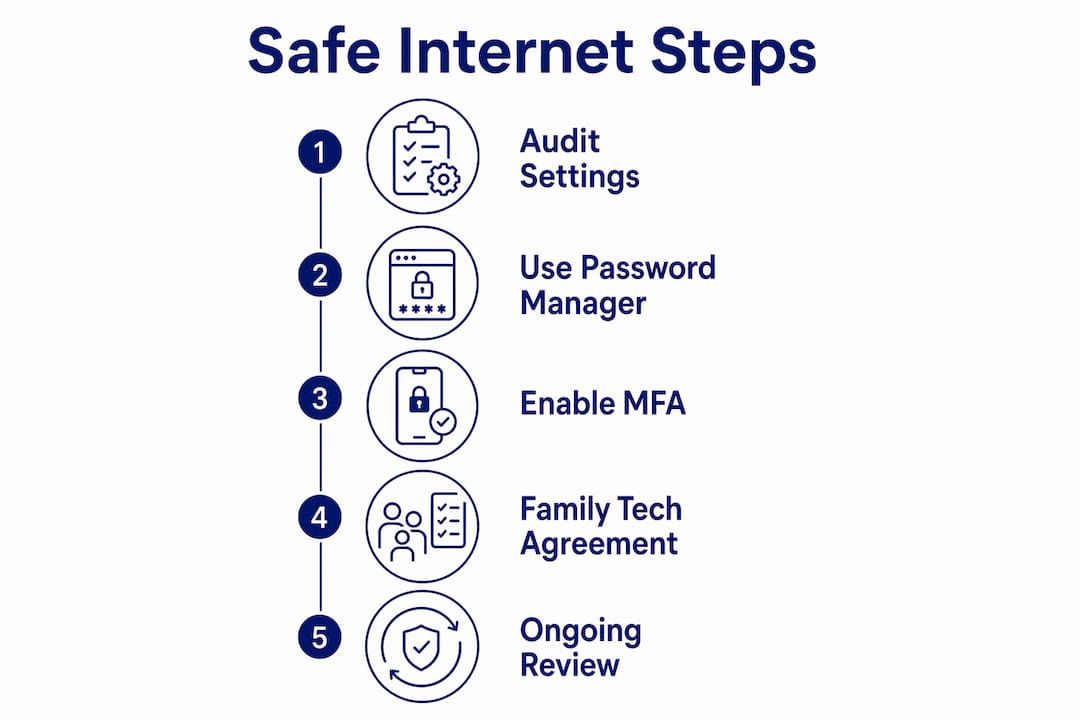
Audit all device and app privacy settings. Go through every device your family uses. Turn off location access for apps that do not need it. IT experts recommend auditing privacy settings annually to reduce unnecessary data collection. Disable permissions that were granted by default but are not actively needed.
Install a password manager and generate unique passwords. Set up Bitwarden or a similar tool on every family device. Replace any reused or weak passwords with unique ones generated by the manager. This step alone closes one of the most common attack vectors.
Enable MFA on all critical accounts, starting with email. Work through email first, then banking, then social media. Use an authenticator app rather than SMS wherever possible. This step is the single highest-impact action you can take for protecting personal information online.
Establish and sign your Family Tech Agreement. Use the process outlined in the previous section. Make sure every family member, including younger children, understands what they have agreed to.
Set up device-level parental controls and content filters. iOS, Android, and Windows all include built-in parental control features. Configure screen time limits, content filters, and app restrictions appropriate to each child’s age.
Schedule regular education conversations and activity check-ins. Sit down with your children weekly or fortnightly to talk about what they have seen, played, or experienced online. Keep the tone curious, not interrogative. Children who feel safe reporting problems are far better protected than those who fear punishment.
Back up all family data using the 3-2-1 rule. The 3-2-1 backup rule means keeping 3 copies of important data, on 2 different types of media, with 1 copy stored offsite or in the cloud. This protects against ransomware, device theft, and accidental deletion.
Pro Tip: Block out two hours on a weekend to complete steps 1 through 3 in a single session. Getting the technical foundations in place quickly means your Family Tech Agreement is backed by real protections from day one.
Step | Action | Key outcome |
1 | Audit privacy and location settings | Reduced data collection exposure |
2 | Install password manager | Unique, strong passwords across all accounts |
3 | Enable MFA on email and key accounts | Blocked unauthorised account access |
4 | Sign Family Tech Agreement | Clear behavioural expectations for all family members |
5 | Configure parental controls | Age-appropriate content filtering |
6 | Regular education check-ins | Children who report problems early |
7 | Apply 3-2-1 backup rule | Data protected against loss or attack |
How do you monitor and maintain safe internet habits over time?
Setting up protections once is not enough. Online risks evolve, children grow, and the platforms they use change constantly. Ongoing maintenance is what separates families who stay safe from those who think they are safe.
Review privacy settings on all devices and accounts every six months. New app updates frequently reset permissions or introduce new data-sharing options that were not there before.
Monitor your children’s online activity in a way that respects their growing independence. Transparency works better than surveillance. Tell children you will occasionally review activity, and explain why.
Learn the early signs of cyberbullying: sudden withdrawal from devices, anxiety before or after going online, or reluctance to discuss what they are doing. Cyberbullying prevention starts with noticing these signals early.
Keep all software, browsers, and operating systems set to update automatically. Manual updates get skipped. Automatic updates do not.
When children try to bypass parental controls, treat it as a conversation starter, not just a rule violation. Understanding why they wanted access tells you far more than simply re-blocking the content.
“Family discussions about online boundaries and acceptable behaviour remain the most impactful safety measure, surpassing purely technical controls. Parents who talk openly with their children about online risks consistently report better outcomes than those who rely on filters alone.” — eSafety Commissioner
Parents’ own lax privacy settings often expose children to social engineering risks. Your digital hygiene matters as much as your child’s. A parent with an unsecured social media profile, weak passwords, or oversharing habits creates real vulnerabilities for the whole family.
Pro Tip: Set a recurring calendar reminder every six months labelled “Family Digital Safety Review.” Treat it like a smoke alarm test. It takes 30 minutes and it genuinely matters.
Key takeaways
Safe internet use requires combining technical protections, clear family agreements, and ongoing conversations to create a genuinely secure digital environment for children.
Point | Details |
Start with technical foundations | Install a password manager and enable MFA on email before anything else. |
Use authenticator apps over SMS | Authenticator apps block SIM-swapping attacks that SMS codes cannot. |
Family Tech Agreements work | Written, co-created agreements set expectations children are more likely to follow. |
Maintenance is not optional | Review settings, agreements, and conversations every six months as risks evolve. |
Parents’ own habits matter | Your privacy settings and digital behaviour directly affect your children’s safety. |
Why I think most parents are solving the wrong problem first
When parents ask me about online safety, they almost always lead with the same question: “Which app should I use to block bad content?” I understand the instinct. Filters feel like control. But after working in this space for a long time, I have come to believe that the filter-first approach is actually backwards.
Technical controls are necessary. I am not dismissing them. But a child who has never had a real conversation about why certain content is harmful will find a way around any filter you install. They will use a friend’s device, a school computer, or a VPN they downloaded in five minutes. The filter does not travel with them. The values you build together do.
What I have seen work, consistently, is parents who treat digital safety the way they treat road safety. You do not just put your child in a car seat and hope for the best. You teach them to look both ways. You explain why the rules exist. You have the same conversation again when they are older and the risks have changed. That is the model that actually protects children, not a set-and-forget parental control app.
The other thing I want parents to hear is this: your own digital habits are not separate from your child’s safety. Your privacy settings and online behaviour create the environment your child grows up in. If you share their photos publicly, use weak passwords, or click suspicious links, you are modelling exactly the behaviour you are trying to prevent. Start with yourself. It is the most underrated step in any internet safety checklist.
For parents who want to go deeper on the values side of this, Cybercompassconsulting’s work on digital citizenship for families is worth your time.
— Jemma
How Cybercompassconsulting supports families with cyber safety
Knowing the steps is one thing. Putting them into practice with a busy family, across multiple devices and different-aged children, is another challenge entirely.
Cybercompassconsulting works directly with families to build practical, personalised cyber safety plans that reflect how your household actually operates. The team brings over 35 years of experience in cyber wellness, blending behavioural science with technical guidance so that safety habits stick. Whether you need a one-off consultation or an ongoing programme, the family cyber wellness services are designed to meet you where you are. You can also build a tailored cyber wellness plan that covers every step in this guide, adapted for your family’s specific needs and your children’s ages.
FAQ
What is safe internet use for children?
Safe internet use is the practice of applying technical protections, privacy settings, and family agreements to reduce children’s exposure to online risks. It combines tools like MFA and parental controls with regular family conversations about acceptable online behaviour.
Why should I enable MFA on email first?
Your primary email account controls password resets for almost every other service you use. Securing email with MFA first means that even if another account is compromised, attackers cannot use it to access everything else.
How often should I review our family’s internet safety settings?
Review privacy settings, parental controls, and your Family Tech Agreement every six months. New app updates frequently reset permissions, and children’s online habits change quickly enough that annual reviews leave too many gaps.
What are the signs my child is experiencing cyberbullying?
Watch for sudden withdrawal from devices, visible anxiety before or after going online, and reluctance to talk about their digital activities. Early recognition allows you to respond before the situation escalates.
Does the 3-2-1 backup rule apply to family data?
The 3-2-1 backup rule applies to any data worth keeping, including family photos, school documents, and financial records. Keep 3 copies on 2 types of media with 1 stored in the cloud to protect against device loss or ransomware.
Recommended
Comments