Safe screen time habits guide for families, schools, and businesses

What safe screen time habits actually look like
The most important shift in thinking about screen time is this: duration alone tells you almost nothing. What matters is how screens affect the rest of life. The eSafety Commissioner advises checking whether screen use is affecting mental health, relationships, sleep, and work or study performance before reaching for a timer.
ARC Centre researchers make the case plainly: rigid duration caps can be counterproductive. What works is developmentally appropriate, quality-focused use that supports children’s growth rather than simply policing the clock.

Australia does maintain age-based guidelines as a starting point. Children under two should have no recreational screen time; those aged 2–4 are recommended to have limited recreational screen time; children aged 5–12 are advised to keep recreational use moderate. These figures are a floor, not a ceiling on good judgement.
Core principles that underpin genuinely safe digital habits:
Quality over quantity. Co-viewing, enriching content, and purposeful use matter more than raw minutes.
Offline impact check. If screens are crowding out sleep, physical activity, face-to-face connection, or schoolwork, that is the real signal.
Technology-free zones and times. Bedrooms and mealtimes are the two most effective places to start.
Physical health awareness. Excessive screen use is linked to eye strain, poor posture, and disrupted sleep. Balancing screens with movement is not optional.
Digital citizenship. Responsible, respectful online behaviour is a skill, not a setting. It needs to be taught.
Whole-community consistency. When families, schools, and workplaces carry the same message, it sticks. Fragmented rules create gaps that screens fill.
Behavioural resilience. Children and adults who understand why limits exist, and who have been involved in setting them, are far more likely to follow them.
Table of Contents
How to monitor and manage screen use without the guesswork
Start with honest observation, not apps
Before you reach for a parental control tool, spend a week simply noticing. When are screens used? What replaces them when they are put away? Is the mood in the house better or worse after long screen sessions? That baseline is more useful than any dashboard.
Use built-in device tools deliberately
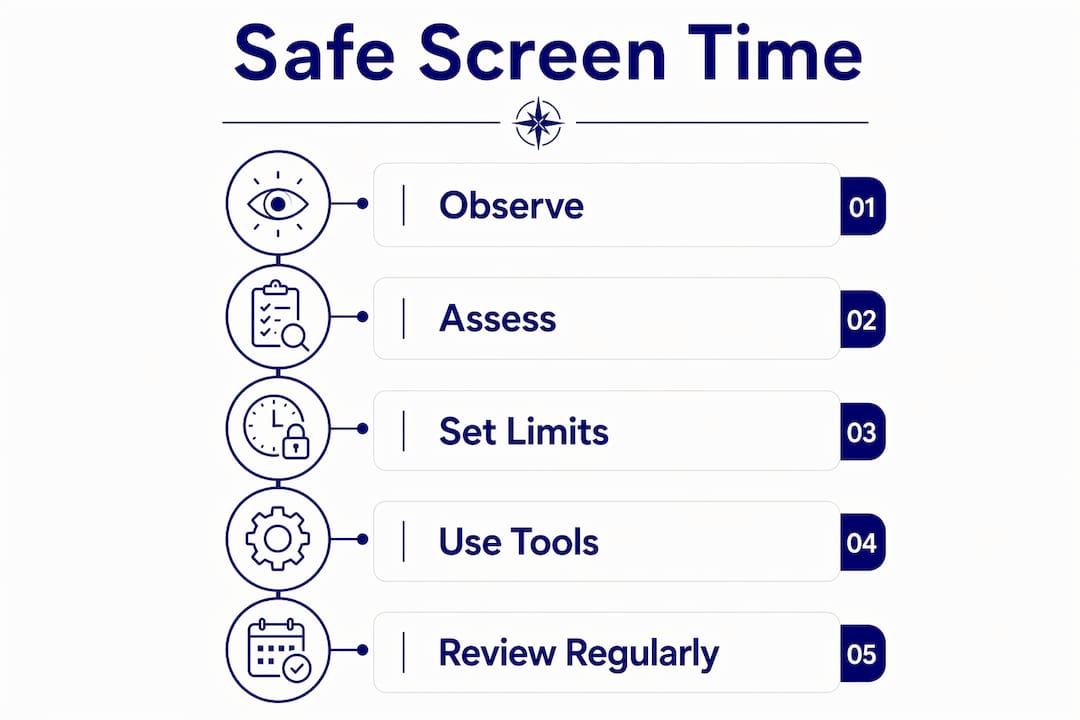
Every major platform now includes usage tracking. Apple’s Screen Time, Google’s Digital Wellbeing, and Android’s Family Link all let you set daily limits, schedule device-free periods, and review which apps are consuming the most time. These tools work best when they are explained to children rather than applied silently.
Age-appropriate zones, not blanket rules
NSW Health research highlights a practical problem: in mixed-age families, younger children often exceed guidelines simply by matching older siblings. Separate device policies and age-specific digital zones are more effective than a single household screen-off rule. A teenager doing homework on a laptop and a five-year-old watching cartoons are not the same situation.
Pro Tip: When setting up household screen rules, involve every age group in the conversation separately. A ten-year-old and a fifteen-year-old have genuinely different needs. One family policy rarely fits both.
Schools: move beyond the permission slip
The eSafety Commissioner’s Best Practice Framework gives schools a clear model: Prepare, Engage, Educate, Respond. It is a whole-school approach that builds online resilience rather than just managing incidents after they happen. Schools that embed cyber literacy into their culture see better outcomes than those relying on one-off assemblies.
Building a safety network of trusted adults and involving students in creating classroom digital agreements gives children genuine ownership of their online behaviour.
Choosing digital wellness apps carefully
The RACGP recommends prioritising apps developed by reputable health organisations. Most available wellness apps lack peer-reviewed backing and may not meet Australian health privacy standards. Before recommending any app to families or staff, check whether it has published evidence behind it and complies with Australian privacy law.
Understanding good screen time versus harmful screen time is a useful framework for educators and parents navigating these choices.
Communication is the underrated lever
Open dialogue reduces conflict and improves adherence to healthy digital habits far more reliably than enforcement alone. Set clear expectations, explain the reasoning, and revisit the conversation as children grow and workplaces evolve.
Cybercompassconsulting brings behavioural science to your digital wellness plan
Most screen time advice stops at settings and schedules. Cybercompassconsulting goes further. With over 35 years of experience integrating behavioural science with cyber safety education, the team works with families, schools, and SME businesses to build digital habits that actually hold under pressure.
The difference is in the approach. Rather than handing over a checklist, Cybercompassconsulting builds personalised programmes that address the human side of screen use: technostress, compulsive checking, and the social dynamics that make limits hard to keep. For schools, there are dedicated cyber wellness school programmes. For families, there is tailored coaching that fits your household’s actual rhythm. For businesses, the focus is on reducing human error and building a culture where safe digital habits are the norm, not the exception.
Book a consultation at Cybercompassconsulting to build a plan that works for your community.
Key takeaways
Safe screen time habits require a whole-community approach that prioritises quality of use, offline impact, and behavioural resilience over fixed duration limits alone.
Point | Details |
Quality beats duration | Assess how screens affect sleep, relationships, and performance, not just how many hours are logged. |
Age-specific zones work better | Separate device policies for different age groups prevent younger children from exceeding guidelines by copying older siblings. |
Schools need a whole-school model | The eSafety Commissioner’s Prepare, Engage, Educate, Respond framework builds resilience, not just rules. |
App selection requires scrutiny | RACGP recommends only apps with peer-reviewed backing and compliance with Australian health privacy standards. |
Cybercompassconsulting | Offers behavioural science-based programmes for families, schools, and businesses to build lasting safe digital habits. |
Recommended
Comments