Two-factor authentication for SMEs: a practical guide
Two-factor authentication (2FA) adds a second, distinct check to every login — and for an SME, it’s the fastest, highest-value step you can take to reduce account takeovers. Enable it now on your admin and cloud accounts: email, finance, and payroll first. Multi-factor authentication guidance from NIST confirms that 2FA requires two factors from different categories before access is granted. It’s a specific form of multi-factor authentication (MFA); the difference is that 2FA uses exactly two factors while MFA can use two or more.
The three factor categories, with one SME example each:
Something you know — a password or PIN (your Microsoft 365 login password)
Something you have — an authenticator app, hardware security key, or SMS code (Google Authenticator on your phone)
Something you are — a biometric like a fingerprint or face scan (Face ID on a company iPhone)
Australia’s cyber.gov.au guidance on MFA and vendor setup pages from Microsoft and Google walk through step-by-step enablement for the most common cloud tools your business already uses.
Table of Contents
How does two-factor authentication work in practice?
The mechanics are straightforward. At login, you enter your password (something you know). The system then asks for a second factor from a different category — a code from an authenticator app, a tap on a hardware key, or a biometric scan. Only when both checks pass does access open.
A typical cloud email scenario: you type your password into Microsoft 365, and Microsoft Authenticator sends a push notification to your phone. You approve it. Done. The whole exchange happens very quickly.
What matters here is the “different category” rule. Two passwords, or a password plus a security question, are both “something you know” — that’s not true 2FA, and it fails if an attacker has already stolen your credentials. Genuine 2FA forces an attacker to compromise two separate things: your password and your physical device or biometric.
Passkeys and platform authenticators (like Windows Hello or Apple’s Face ID) blur the line slightly. They replace the password entirely with a cryptographic key stored on your device, verified by your biometric. That’s technically passwordless, but it still satisfies the two-factor principle because possession of the device plus the biometric together constitute two bound factors. Push notifications work similarly: the app on your phone acts as the “something you have,” and approving the prompt is the second check.
Why SMEs should care about two-factor authentication
The honest answer is that SMEs are attractive targets precisely because they’re assumed to have weak controls. Credential theft, phishing emails, SIM-swap fraud, and credential stuffing are the most common attack routes. CISA’s MFA guidance is direct: enabling MFA is one of the most effective steps any organisation can take to prevent account takeovers.
The accounts worth protecting first:
Administrator accounts — full system access makes these the highest-value target
Finance and payroll — direct path to funds and sensitive employee data
Executive email — used for business email compromise and wire-transfer fraud
HR systems — contain identity data that enables further attacks
Customer data platforms — a breach here carries reputational and regulatory consequences
The ROI case is genuinely compelling. Many fundamental 2FA capabilities are included at no additional cost in Microsoft Entra ID and Google Workspace — suites most SMEs already pay for. Hardware security keys (like YubiKey, available in Australia through Yubico’s local distributors) cost extra, but they represent the strongest protection available.
Consider a simple scenario: a staff member’s Microsoft 365 password is stolen in a phishing attack. Without 2FA, the attacker logs straight in. With 2FA enabled, the stolen password is useless — the attacker still needs the employee’s phone or hardware key. That single control stops the breach.
Comparing common 2FA methods for your business
Not all second factors are equal. The table below compares the five main method categories across the dimensions that matter most to an SME decision-maker.
Method | Security / phishing resistance | Ease of use for staff | Cost to business | Deployment complexity | Recovery if device is lost |
SMS one-time code | Low — vulnerable to SIM-swap and interception | Easy — familiar to most staff | Nil (carrier-based) | Low | Easy — re-issue to new SIM |
Authenticator app (e.g. Google Authenticator, Microsoft Authenticator) | Medium-high — not phishing-resistant but far better than SMS | Moderate — requires app install | Nil — included in most suites | Low-medium | Backup codes or re-enrolment |
Push notification (e.g. Microsoft Authenticator push) | Medium-high — vulnerable to push-fatigue attacks | Very easy — one tap | Nil — included in Microsoft/Google | Low | Re-enrol device; backup codes |
Hardware security key (e.g. YubiKey) | Very high — phishing-resistant by design | Moderate — physical key required | Low-medium (key purchase) | Medium | Spare key or backup codes |
Biometrics / platform authenticator (Windows Hello, Face ID) | Very high — phishing-resistant, device-bound | Very easy — seamless | Nil on modern devices | Low-medium | Device recovery or backup method |
Google Workspace documentation explicitly states that security keys are the strongest 2-Step Verification method, with platform authenticators and push prompts as strong alternatives to SMS. CISA recommends moving away from SMS where possible and adopting phishing-resistant authenticators.
Pro Tip: Prioritise hardware keys (YubiKey) or platform authenticators (Windows Hello, Face ID) for administrator and finance accounts. These are phishing-resistant by design — an attacker who tricks a staff member into entering their password on a fake site still cannot use a hardware key remotely. For the rest of your team, Microsoft Authenticator or Google Authenticator push notifications are a practical, low-friction upgrade from SMS.
Authenticator apps and push notifications also tend to be faster for staff than typing a six-digit code, which matters for adoption. A method that frustrates people gets disabled or worked around.
How to implement 2FA in your SME: a step-by-step rollout
A staged rollout is far more effective than a sudden switch. Here’s a practical plan with a realistic timeline.

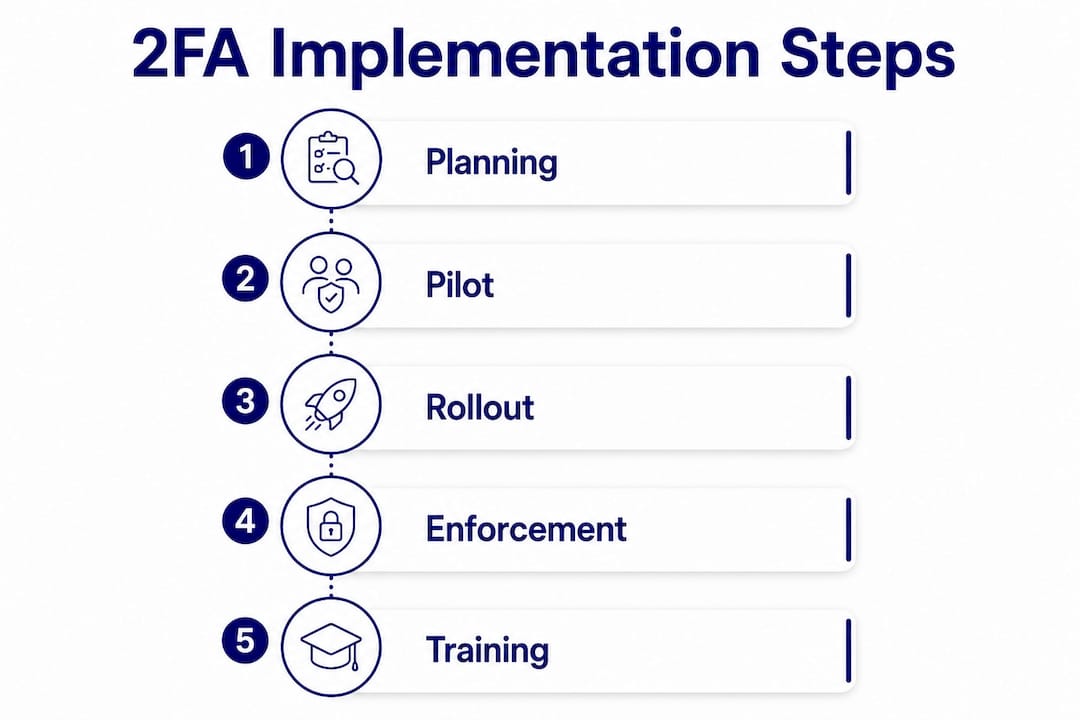
1. Planning (Week 1–2) Audit which accounts and systems exist, identify your admin and high-privilege users, and choose your preferred method (authenticator app as baseline; hardware keys for admins). Check what’s already available in your Microsoft or Google subscription. Document a recovery procedure before you enforce anything.
2. Pilot with early adopters (Week 2–3) Enable 2FA for a small group of willing staff, ideally including at least one admin. Collect feedback on friction points. Set up backup codes for every pilot participant and confirm the recovery process works.
3. Wider rollout (Week 3–5) Communicate to all staff with clear instructions and a deadline. Provide a short how-to guide (screenshots help). Make the authenticator app available and supported. Run a brief Q&A session or drop-in.
4. Mandatory enforcement (Week 5–6) Use your platform’s conditional access or enforcement controls (Microsoft Entra Conditional Access; Google Workspace admin console) to require 2FA at login. Accounts without 2FA enrolled should be blocked from access until they complete setup.
5. Post-rollout review (Week 7–8) Check enrolment rates in your admin console. Identify any accounts still using SMS and plan upgrades. Review your recovery runbook and confirm emergency admin access works.
Recovery options to set up before enforcement:
Generate and store backup codes securely for every enrolled account
Register a secondary device (a spare phone or tablet) for key admin accounts
Create at least one emergency admin account with a different 2FA method
Document a written runbook: who to call, how to re-issue access, how to handle a lost device
Staged rollout and training approaches used in structured cyber awareness programmes apply equally well here — the human side of implementation is where most rollouts succeed or stall.
The cost picture is straightforward. Microsoft Entra ID free tier and Google Workspace both include authenticator app and push notification support. YubiKey hardware keys are available in Australia and represent an additional per-key cost, but for admin and finance roles, the risk reduction justifies it.
How to pick the right 2FA approach for your SME
Before you commit to a method, work through these questions honestly.
Assess your internal capability:
Do you have in-house IT support, or does one person manage everything alongside their day job?
How many staff work remotely, and on what devices?
Do you have a bring-your-own-device policy, or are all devices company-managed?
What’s your realistic budget for security tools this year?
Match the method to your SME profile:
A micro-business with no dedicated IT and five staff is best served by Google Authenticator or Microsoft Authenticator push notifications — zero cost, low setup complexity, and familiar enough that staff will actually use them. A 50-person SME with a part-time IT manager and remote workers should layer in hardware keys for admin accounts and enforce 2FA via Microsoft Entra Conditional Access or Google Workspace’s admin controls.
Vendor-selection questions worth asking:
Does the platform support enforcement (blocking login without 2FA), not just optional enrolment?
What recovery options does it offer if a staff member loses their device?
Does it provide audit logs showing who authenticated, when, and how?
A note for Australian SMEs: cyber.gov.au’s MFA guidance is the most relevant local reference for policy language. Including a direct reference to that guidance in your internal 2FA policy adds credibility and aligns with the Australian Signals Directorate’s recommendations. Hardware key supply in Australia is reliable through Yubico’s authorised local distributors, so availability isn’t a barrier.
For employee cyber hygiene more broadly, 2FA is the single highest-impact habit to establish first — everything else builds on it.
Practitioner guidance from Cybercompassconsulting: behaviour, recovery, and policy
The technology is the easy part. What actually determines whether 2FA sticks in an SME is how it’s introduced and what happens when something goes wrong.

Cybercompassconsulting’s approach treats 2FA as a digital-wellness habit, not a compliance checkbox. When leaders model the behaviour — when the business owner or manager is visibly the first to enrol — staff follow. Frame it as “we’re protecting each other’s work” rather than “IT is making things harder.”
Pre-rollout announcement template (email or team message):Mandatory enforcement notice:Recovery runbook outline:
Staff member reports they cannot log in (lost phone, new device, etc.)
Designated IT contact or admin verifies identity via a secondary channel (video call, in-person)
Admin temporarily bypasses 2FA or issues a backup code via the admin console
Staff member re-enrols 2FA on their new device before access is fully restored
Incident is logged (date, account, reason, resolution)
For recovery planning and contingency procedures, treating access credentials as assets that need a backup strategy is exactly the right mental model. An anonymised example: one professional services firm avoided a Monday morning lockout because their IT contact had documented the re-enrolment steps and stored backup codes in a password manager accessible to two people. The recovery took eight minutes instead of three hours.
Key takeaways
Two-factor authentication is the single most effective, lowest-cost control an SME can enable today — start with admin accounts, set up recovery options first, and prioritise phishing-resistant methods where possible.
Point | Details |
Enable 2FA on admin accounts first | Administrator, finance, and executive accounts are the highest-value targets — protect these before anything else. |
Use phishing-resistant methods where you can | Hardware keys (YubiKey) and platform authenticators (Windows Hello, Face ID) resist phishing; SMS does not. |
Set up recovery before enforcement | Backup codes, a spare admin account, and a written runbook must exist before you make 2FA mandatory. |
Most SMEs pay nothing extra | Microsoft Entra ID and Google Workspace include authenticator app and push notification support at no additional cost. |
Cybercompassconsulting supports SME rollouts | Cybercompassconsulting offers SME security audits and cyber wellness planning to guide implementation from policy to staff adoption. |
The part most guides skip
There’s a version of the 2FA conversation that treats it as purely a technical toggle — enable it, tick the box, move on. That framing misses something real.
The businesses I see struggle most with 2FA aren’t the ones who can’t configure Microsoft Entra. They’re the ones who roll it out without telling anyone why it matters, then spend the next month fielding lockout calls and watching staff find workarounds. The technology works. The culture around it is what breaks.
What actually changes outcomes is treating 2FA as the opening move in a broader conversation about how your team relates to digital security. When staff understand that a stolen password is genuinely dangerous — not a hypothetical — they stop seeing the second factor as friction and start seeing it as protection. That shift doesn’t happen from a policy document. It happens from a five-minute conversation, a leader who models the behaviour, and a recovery plan that proves the business has thought this through.
The other thing worth saying plainly: SMS codes are better than nothing, but they’re not where you want to stay. SIM-swap fraud is real, it targets businesses, and it’s specifically designed to defeat SMS-based 2FA. If your admin accounts are protected by SMS codes today, that’s a good start — and your next step is moving them to an authenticator app or hardware key.
Cybercompassconsulting helps SMEs get 2FA right
Setting up 2FA is a one-afternoon job for a solo operator with a Google account. For an SME with fifteen staff, mixed devices, a payroll system, and no dedicated IT support, it’s a project — and the recovery planning alone takes longer than most business owners expect.
Cybercompassconsulting works with Australian SMEs to make that project manageable. The Build a Cyber Wellness Plan service covers 2FA policy design, method selection, staff communications, and recovery runbook development — the full picture, not just the technical setup. For businesses that want a faster start, a focused SME security audit identifies your highest-risk accounts and gives you a prioritised action list within days. Services are available to Australian businesses of all sizes, and sessions can be delivered virtually.
To get started, book a consultation and bring your current setup questions. You’ll leave with a clear plan, not just a checklist.
Recommended
Comments