What is a digital footprint and how to manage yours

Your digital footprint is the unique trail of data created by everything you do online, both the things you post deliberately and the data collected about you without your knowledge. Think of it as a permanent record that follows you across every website, app, and device you use.
Before reading further, three things you can do right now:
Search your name (in quotes, across Google Images and standard search) and screenshot what comes up.
Enable multi-factor authentication on your email, banking, and social media accounts.
Untag or remove any public posts, photos, or comments you would not want an employer or school admissions officer to see today.
You can reduce your visibility significantly, but once data is public or shared by others, full erasure is effectively impossible. Management and prevention are the realistic goals.
Table of Contents
What is a digital footprint, and what’s the difference between active and passive?
A digital footprint is every piece of data tied to your identity that exists online, whether you put it there or not. The eSafety Commissioner categorises this into two types: active and passive. Understanding the difference tells you what you can control and what requires a different kind of effort.

Type | What it includes | Who controls it | How to manage it |
Active footprint | Posts, comments, uploads, profile info, form submissions, emails sent | Mostly you | Delete, edit, adjust privacy settings |
Passive footprint | Cookies, IP address logs, browsing history, location data, device fingerprints, metadata | Websites, apps, platforms | Browser settings, VPN, opt-outs, account-level controls |
Active data is what you choose to publish: a Facebook post, a product review, a LinkedIn profile update. Passive data is gathered in the background while you browse, often without any obvious notification. A website logs your IP address the moment you land on it. An app records your location even when you are not actively using it. Tracking pixels embedded in emails confirm when you opened a message and on what device.
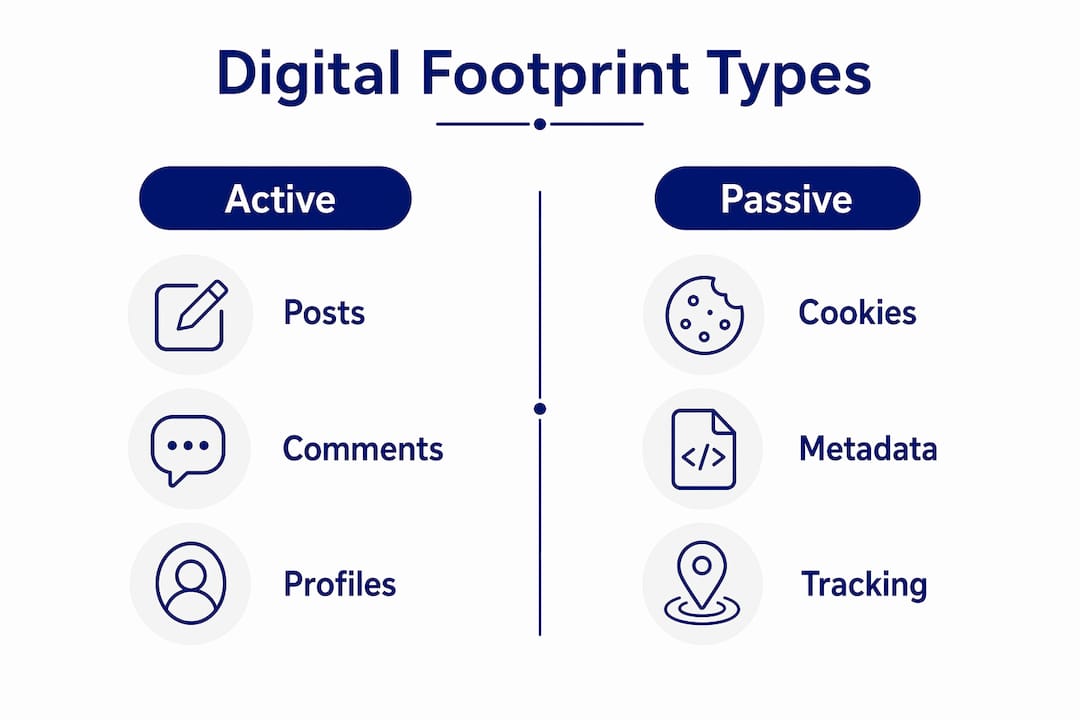
The distinction matters because the strategies for managing each type differ. You can delete a tweet. You cannot easily stop a data broker from holding a profile built from your browsing patterns across hundreds of sites.
What actually counts as part of your digital footprint?
The list is longer than most people expect. Here are the most common sources, along with a note on who typically uses each one:
Social media posts and comments — employers, schools, and background-check services routinely search these; a single old post can surface years later.
Photos and tagged images — metadata embedded in photos (time, GPS coordinates, device model) is readable by anyone who downloads the file; advertisers and investigators use this routinely.
Search history — stored by search engines and, if you are signed in, linked to your account; used to build advertising profiles.
Website visits — logged by servers and tracked via cookies; aggregated data from these visits forms detailed interest profiles used by advertisers and, increasingly, insurers.
Cookies and tracking pixels — small files or invisible images that follow your activity across sites, often for weeks or months after a single visit.
IP address — reveals your approximate location and internet provider; used by platforms, advertisers, and threat actors alike.
App permissions — microphone, camera, contacts, and location access granted to apps; many apps collect this data continuously.
Email headers — contain your IP address, device type, and timestamp; visible to recipients and email service providers.
Public records — electoral roll data, court records, and business registrations are publicly searchable in Australia and regularly harvested by data brokers.
Voice assistant queries — recordings from devices like Amazon Echo or Google Home are stored on company servers and linked to your account.
Tags by other people — someone else tagging you in a photo or post adds to your footprint without your direct action.
That last point catches people off guard. Your footprint is not just what you post. It is also what your friends, colleagues, and family post about you.
Why your digital footprint matters for reputation, opportunity and security
The stakes are real, and they are growing. eSafety guidance is clear that a digital footprint is often the first impression employers and schools encounter, making it a curatable digital asset rather than a passive side effect of being online.
Reputation and first impressions. Hiring managers in Australia commonly search candidates’ names before an interview. University admissions processes increasingly involve online checks. A photo from a party five years ago, a heated comment thread, or an old username linked to embarrassing content can close doors before a conversation even starts.
Privacy and profiling. Single data points are relatively harmless in isolation. The problem is aggregation. As IBM notes, repeated small signals — searches, site visits, likes, purchases — are combined by third parties into predictive profiles that can be more revealing than any single post. These profiles influence the ads you see, the prices you are quoted, and sometimes the credit decisions made about you.
Security risks. Publicly available personal data is a goldmine for cybercriminals. Threat actors use details from social media, public records, and data broker profiles to craft convincing phishing emails and social engineering attacks. Knowing your employer’s name, your manager’s name, and your recent holiday destination makes a fake “urgent IT request” email far more believable.
“Digital footprints contain sensitive information that is valuable to threat actors. Using tracking and monitoring techniques, threat actors can access and exfiltrate this sensitive information, jeopardising its confidentiality and security.” — Canadian Centre for Cyber Security
Australian families and students. For parents and educators, the concern is particularly acute. Young people often share freely without understanding the permanence of what they post. The NSW Government’s digital citizenship resources frame this well: a digital footprint becomes a digital persona through aggregation, where repeated small signals combine into profiles that can follow a young person into adulthood.
How are digital footprints created and collected?
Most collection happens invisibly. Understanding the mechanisms helps you decide where to intervene.
Cookies are the most familiar tool. A website drops a small file on your device that tracks your activity, both on that site and, via third-party cookies, across other sites. Advertising networks use these to follow you around the web.
Tracking pixels are single-pixel images embedded in web pages and emails. When your browser or email client loads the image, it sends data back to the server: your IP address, browser type, and the time you opened the message.
Server logs record every request made to a website, including your IP address, the page you visited, and the time. These logs are retained for varying periods and are often shared with analytics providers.
Device fingerprinting is subtler. Websites can identify your device by combining details like your browser version, screen resolution, installed fonts, and time zone. No cookie required. This fingerprint is often unique enough to identify you across sessions even after clearing your cookies.
App permissions extend collection into your physical environment. A navigation app that requests location access continuously is building a detailed record of where you go and when.
Data brokers sit at the top of this ecosystem. Companies like Acxiom and Equifax (operating in Australia) aggregate data from hundreds of sources — public records, loyalty programmes, browsing data purchased from apps — and sell profiles to marketers, insurers, and employers. One small data point becomes part of a much larger picture once it reaches a broker’s database.
Metadata compounds all of this. A photo uploaded to social media carries embedded data about the device used, the time taken, and often the GPS coordinates of where you were standing. Even after platforms strip some metadata, copies shared elsewhere may retain it.
How to audit your digital footprint step by step
A thorough audit takes about an hour the first time. After that, a monthly check takes fifteen minutes. Here is a repeatable process:
Search your name in quotes on Google, Bing, and DuckDuckGo. Try variations: full name, nickname, name plus suburb, name plus employer. Screenshot every page of results.
Search Google Images for your name and, separately, upload a photo of yourself to check for reverse-image matches.
Search your email addresses to see which accounts and data breaches they are linked to. Use Have I Been Pwned (a free, reputable service) to check whether your email appears in known data breaches.
List every online account you hold, including old forums, gaming platforms, and shopping sites. A password manager like Bitwarden or 1Password can help surface accounts you have forgotten.
Review privacy settings on each active account: who can see your posts, your friends list, your tagged photos, and your contact details.
Check app permissions on your phone. On both iOS and Android, you can review which apps have access to your location, microphone, camera, and contacts.
Request your data from major platforms. Facebook, Google, Apple, and most large services offer a data download option in account settings. In Australia, the Privacy Act 1988 gives you the right to request access to personal information held about you by organisations covered by the Act; contact the Office of the Australian Information Commissioner (OAIC) for guidance on making access requests.
Search data broker sites and submit opt-out requests. Common brokers operating in Australia include Spokeo, Whitepages, and PeopleFinder. Keep a record of every request you submit and the date.
For monitoring digital behaviour on an ongoing basis, setting a Google Alert for your name costs nothing and delivers results to your inbox automatically.
How to manage, reduce and clean up your digital footprint
Once you know what is out there, the work of reducing it begins. Prioritise in this order: public content visible to anyone, content visible to employers or schools, and then leaked or exposed personal data.

Removal and clean-up
Request deletion of posts, comments, and photos directly through platform settings where possible. For content you did not post yourself, use the platform’s reporting tools. If a platform refuses to remove harmful content, the eSafety Commissioner has formal reporting pathways for serious online abuse and image-based abuse. Close accounts you no longer use rather than leaving them dormant — an inactive account is still a data point, and a vulnerable one if the password is weak or reused.
Privacy settings
Work through each active platform and tighten who can see your content, your friend or follower list, and your contact details. On Facebook, the Privacy Checkup tool walks you through the main settings. On Instagram, switching to a private account is a single toggle. On LinkedIn, review what is visible to people outside your network.
Security basics
Practical steps to reduce exposure work best when paired with securing what remains. Enable multi-factor authentication on every account that offers it, starting with email and banking. Use a password manager to generate and store unique passwords for every account. Keep your devices and apps updated, since many updates patch vulnerabilities that allow passive data collection.
Browser and tracking controls
Switch to a browser with stronger privacy defaults, such as Firefox or Brave. Install an ad blocker like uBlock Origin. Regularly clear cookies, or use a browser setting that clears them automatically on close. Consider a reputable VPN for additional IP masking, particularly on public Wi-Fi.
Can you actually erase your digital footprint?
Honestly, no. Not completely. Once data is public or shared by others, deletion reduces visibility but historical copies, caches, and third-party archives often persist. The Wayback Machine at archive.org archives billions of web pages. Google’s cache holds copies of pages for weeks after the original is removed. Screenshots shared in private messages exist on other people’s devices indefinitely.
Data brokers are a particular challenge. Submitting an opt-out request to one broker does not remove your data from the dozens of others who may hold similar profiles. And brokers regularly re-acquire data, so a profile you successfully removed can reappear months later.
The practical flow for removal attempts looks like this: identify what exists and where, request removal through official channels, document every request with dates and screenshots, monitor for reappearance using Google Alerts and periodic searches, and mitigate residual visibility by creating fresh, positive content that pushes older material down in search results.
That last step, sometimes called search engine reputation management, is underused. Publishing a professional LinkedIn profile, contributing to industry forums under your real name, or maintaining a personal website gives search engines newer, more authoritative content to rank above older material you cannot remove.
Managing your footprint as part of cyber wellness
Footprint management is not just a technical task. It is a behaviour. The data that causes the most lasting harm rarely comes from a sophisticated hack; it comes from a moment of poor judgement — a post made in anger, a photo shared without thinking, a permission granted without reading the fine print. This is where digital habits matter as much as settings.
For families, the conversation starts early. Children need to understand that tagging a friend in a photo is an act with consequences for that friend’s footprint, not just their own. Parental controls on devices are a starting point, but they are not a substitute for ongoing conversation about consent, permanence, and the difference between a private moment and a public post. The eSafety Commissioner’s guidance on tagging and consent is a useful reference for these conversations.
For schools, embedding cyber literacy into the curriculum means students learn to think critically about what they share before they share it, rather than managing the fallout afterwards. Age-appropriate account strategies — delaying social media until platform age limits are genuinely met, using private accounts, and reviewing follower lists regularly — reduce passive data collection and limit the audience for any single post.
From a cybersecurity perspective, a smaller footprint is a harder target. Threat actors who cannot find your employer, your home suburb, and your family members’ names on a public profile have far less material to craft a convincing phishing message. Reducing your footprint is, in that sense, a form of attack surface reduction.
Pro Tip: One of the highest-impact habit changes is turning off location sharing for apps that do not genuinely need it. Most social, shopping, and gaming apps request location access by default. Revoking it takes thirty seconds per app and removes a continuous stream of passive data from your footprint.
Your digital footprint action checklist
Do now
Search your name and screenshot results across Google, Bing, and Google Images.
Enable MFA on email, banking, and social media accounts.
Remove or hide any public posts, photos, or comments you would not want an employer to see.
Check your email address on Have I Been Pwned.
Weekly
Review any new mentions or tags in your social media notifications.
Check privacy settings on any new app or account you have created.
Review app permissions on your phone for any newly installed apps.
Monthly
Run a fresh name search and compare results to your previous screenshot.
Download your data from at least one major platform and review what is stored.
Check data broker opt-out status and resubmit requests where profiles have reappeared.
Refresh passwords on high-value accounts using your password manager.
Review your Google Alert results for your name.
Key takeaways
Your digital footprint shapes your reputation, your security, and your opportunities — treat it as a curatable asset that requires active management, not a passive side effect of being online.
Point | Details |
Active vs passive footprints | Active data is what you post; passive data is collected automatically — each requires different management strategies. |
Aggregation is the real risk | Single data points seem harmless, but combined across platforms they form detailed profiles used for advertising, hiring decisions, and targeted scams. |
Full erasure is not realistic | Caches, archives, and third-party copies persist after deletion; focus on reducing visibility and preventing future exposure. |
Use the audit cycle | Search yourself, remove urgent content, secure accounts, then monitor monthly using eSafety and OAIC resources. |
Cybercompassconsulting | Offers cyber wellness programs, school workshops, and family coaching to move from awareness to lasting behaviour change. |
Why this matters more than most people realise
There is a tendency to treat digital footprint management as something teenagers need to worry about, or something IT departments handle. Neither is quite right. The footprint you have accumulated over years of ordinary internet use — the forums you joined in 2012, the photos tagged at a work event, the loyalty programme you signed up for at a supermarket — is already out there, already being aggregated, and already shaping how algorithms and people perceive you.
What concerns me most, working with families and schools, is the gap between awareness and action. Most people know, in a vague sense, that their data is being collected. Far fewer have ever searched their own name, reviewed their app permissions, or submitted a single data broker opt-out request. The knowledge exists; the habit does not.
The other thing worth saying plainly: other people’s behaviour affects your footprint in ways you cannot fully control. A friend who tags you in a photo, a colleague who mentions you in a public post, a family member who shares your contact details — all of these contribute to your digital profile without your consent. Managing your own settings is necessary but not sufficient. The social norms within your circles matter too, and that is a conversation, not a setting.
The good news is that even modest, consistent effort makes a real difference. A smaller footprint is a harder target for phishing. A curated public profile gives employers and schools a better first impression. And the habit of thinking before posting, once established, compounds over time in ways that no single privacy setting can replicate.
How Cybercompassconsulting can help you move from awareness to action
Knowing what a digital footprint is and actually doing something about it are two different things. Most people get stuck between the two.
Cybercompassconsulting works with families, schools, and SME businesses across Australia to close that gap. Rather than handing over a checklist and leaving, the approach combines practical audits with behavioural science: understanding why people share what they share, and building the habits that reduce risk over time. School programmes include cyber wellness workshops that give students and educators a shared language around digital safety. For businesses, SME security audits identify footprint-related exposures before threat actors do. For families, personalised coaching sessions work through the specific accounts, apps, and conversations that matter most for your household.
The next step is straightforward: book a consultation and start with a structured audit of your current digital presence. From there, the programme is tailored to what you actually need, whether that is a one-off session or an ongoing cyber wellness plan.
Useful Australian sources and tools
eSafety Commissioner — guidance on digital footprints, online reputation, and reporting serious online abuse.
eSafety reporting pathways — for image-based abuse, cyberbullying, and illegal content.
NSW Government digital citizenship resources — practical guidance for students, parents, and educators on healthy online habits.
Office of the Australian Information Commissioner (OAIC) — for privacy rights, data access requests, and complaints under the Privacy Act 1988.
Have I Been Pwned (haveibeenpwned.com) — free tool to check whether your email address appears in known data breaches.
Bitwarden / 1Password — reputable password managers available in Australia for generating and storing unique passwords.
uBlock Origin — free, open-source browser extension for blocking trackers and ads across Chrome, Firefox, and Edge.
Digital citizenship guide for parents and educators — Cybercompassconsulting’s resource for families and schools navigating online safety.
Digital risk management guide — for readers wanting a broader framework for managing online risks at home, school, or in a small business.
College admissions and digital presence — how your online presence can influence higher education admissions decisions.
This article provides general information about digital footprints and online privacy. For advice specific to your situation, including formal data access requests or legal matters, consult the OAIC or a qualified professional.
Recommended
Comments