Student cyber awareness workflow for schools: 2026 guide
- jemmarenshaw
- Jun 17
- 8 min read
A student cyber awareness workflow is a systematic, school-wide process designed to build students’ knowledge, skills, and resilience against cyber threats through coordinated education, behavioural reinforcement, and incident management. Most schools treat cyber safety as a one-off event. A tick-box assembly, a video in PDHPE, a poster on the wall. That approach leaves students exposed, because the threats they face online are not static. Phishing, deepfakes, social engineering, and AI-generated content are evolving faster than any annual training session can address. What schools need is a living, repeatable process. One that connects policy, curriculum, behaviour, and incident response into a single coherent system.
What does a student cyber awareness workflow actually require?
A whole-school approach succeeds because it integrates policy with daily classroom practices and clear escalation mechanisms across multiple teams. That is the foundation. Without it, cyber safety education becomes fragmented, inconsistently delivered, and impossible to measure.
The four foundational prerequisites
Getting this right requires more than good intentions. You need four things in place before any training programme begins:
Cross-team coordination. Safeguarding leads, curriculum coordinators, and IT staff must operate from a shared plan. Each team owns a different piece of the puzzle. None of them can solve it alone.
Policy aligned to current standards. The UK’s KCSIE 2025 framework outlines a whole-school online safety mechanism built on three actions: identify, intervene, and escalate. Australian schools can adapt this structure directly.
Defined expectations for students. Students need to know what safe technology use looks like, what to do when something goes wrong, and who to tell. Vague guidelines produce vague behaviour.
Staff training embedded in the curriculum. Teachers who are not confident in cyber safety cannot model it. Professional development is not optional here.
Prerequisite | What It Looks Like in Practice |
Cross-team coordination | Termly meetings between IT, safeguarding, and curriculum leads |
Policy alignment | Online safety policy reviewed annually against current standards |
Student expectations | Clear, age-appropriate acceptable use agreements |
Staff capability | Annual cyber safety professional development for all teaching staff |
Pro Tip: Map your current policy against the KCSIE 2025 identify-intervene-escalate model. Gaps in any one of those three stages will show up as gaps in your student outcomes.
How does simulated phishing improve student cyber awareness?
Simulated phishing with immediate feedback plus microtraining shapes behaviour better than one-off videos. This is one of the most well-supported findings in student cybersecurity training, and most schools are still ignoring it.

Here is why the difference matters. A single annual video creates passive awareness. Students watch, they forget, and they click the next suspicious link without a second thought. Simulated phishing creates an active learning moment. The student makes a mistake in a safe environment, receives immediate feedback, and completes a short targeted lesson on exactly the failure mode they just demonstrated. That cycle, repeated over time, builds genuine habit.
The recommended sequence is straightforward:
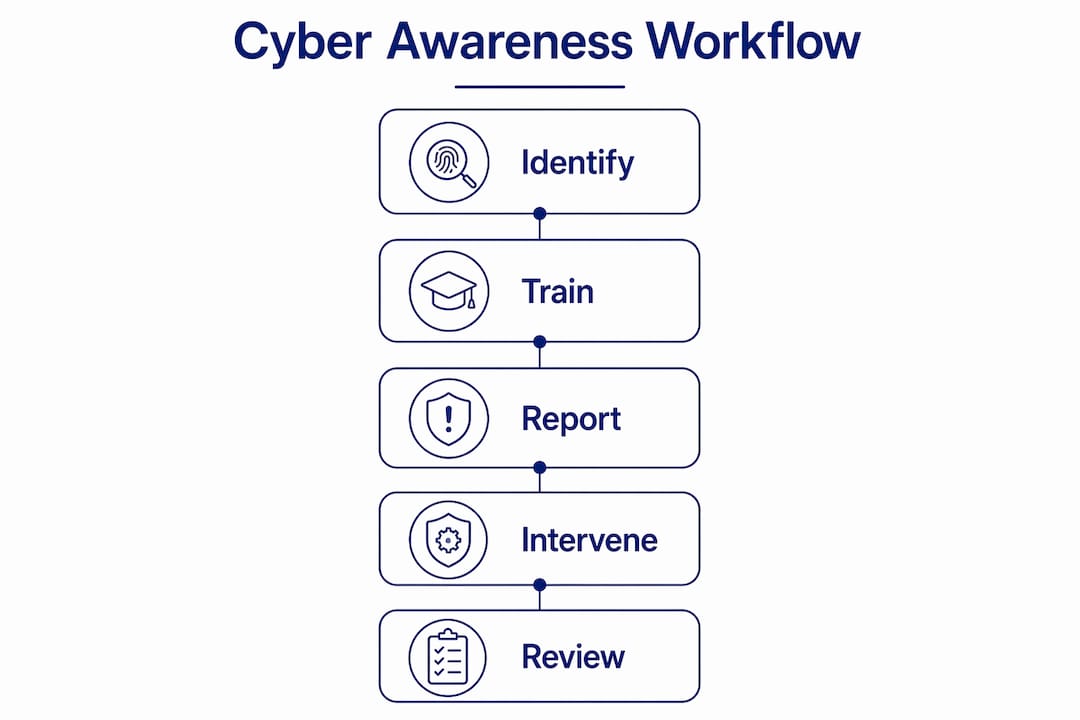
Simulate a phishing attempt tailored to the age group and platform (email, SMS, or social media).
Deliver immediate feedback the moment a student clicks or responds. Do not wait until the next class.
Assign a microlesson targeting the specific vulnerability exposed, whether that is urgency cues, sender spoofing, or suspicious links.
Re-assess with a follow-up scenario within four weeks to measure behaviour change.
Programs like CISA NICCS Cyber Safety for Teens offer self-paced, interactive content covering phishing, scams, strong passwords, privacy settings, and responses to cyberbullying for students aged 13–18. The program uses real-life examples and interactive quizzes, which is exactly the format that produces retention. NSW’s Cybermarvel programme takes a similar approach, using Minecraft Education missions and video discussions to teach privacy management and phishing recognition. Between 2021 and 2025, Cybermarvel engaged over 165,000 students and 3,500 staff and parents. That scale is proof that engaging, curriculum-aligned delivery works.
Scenario-based quizzes covering phishing, deepfakes, social engineering, and cyber hygiene can be tracked for improvement over time. One practical format uses 20 scenarios with optional screenshot submission for teacher review, giving you a clear record of where individual students are struggling.
Pro Tip: Run your first simulated phishing exercise before any formal training. Baseline data on how students respond tells you exactly where to focus your microlearning content.
What behavioural frameworks build lasting student cyber resilience?
Teaching repeatable habits rather than deep technical knowledge increases student resilience across evolving tools. This is the insight that separates a sustainable digital literacy programme from one that becomes obsolete the moment a new platform emerges.
CyberFirst Wales developed the AI SAFE framework specifically to address this. It focuses on four repeatable habits: check outputs, question sources, verify information, and think before sharing. These habits do not require students to understand how a large language model works. They require students to pause, apply a consistent mental process, and act deliberately rather than reactively.
“Teaching students to check, question, verify, and think before sharing gives them a framework that works regardless of what technology they are using. The tool changes. The habit does not.” — CyberFirst Wales, AI SAFE Framework
The power of this approach is its transferability. A student who learns to verify a source before sharing it on Instagram will apply the same habit to a WhatsApp message, a TikTok claim, or an AI-generated image. The specific platform is irrelevant. The habit is everything.
Here is how to embed these habits into daily school routines:
Integrate habit prompts into existing activities. When students use Google Docs, Canva, or any AI writing tool, build in a verification step as part of the task instructions.
Model the habits publicly. When a teacher encounters a suspicious email or a questionable news article, narrate the verification process out loud. Students learn by watching adults practise what they preach.
Reinforce through low-stakes repetition. A two-minute “spot the phish” warm-up at the start of a lesson costs almost nothing and builds the checking habit over time.
Connect behaviour to consequence. Students respond to real examples. When a school shares an anonymised case study of a phishing incident, the abstract becomes concrete.
Linking these behavioural habits to the technical training in your simulated phishing programme creates a complete cycle. Technical training shows students what threats look like. Behavioural habits give them a repeatable process for responding to threats they have never seen before.
How should schools handle incident reporting in the workflow?
Incident readiness requires easy student reporting channels with a no-blame culture, plus defined procedures for early incident timeline capture and communication updates within the first 72 hours. Without this, even the best awareness training produces students who notice problems but say nothing.
The no-blame culture is not a soft concept. It is a structural requirement. When students fear punishment or embarrassment for clicking a suspicious link, they stay silent. That silence is where incidents escalate from minor to serious. Schools that frame reporting as a responsible act, not a confession, see significantly higher reporting rates.
Your incident workflow should follow this sequence:
Step 1: Easy initial report. Students need one clear, low-friction channel. A dedicated email address, a form on the school intranet, or a trusted staff member. Multiple confusing options reduce reporting.
Step 2: Immediate acknowledgement. The student who reports should hear back within the same school day. Silence after reporting teaches students that reporting is pointless.
Step 3: Timeline and evidence capture. The responding staff member documents what happened, when, and on which device or platform. This information is critical for IT triage.
Step 4: Escalation within 72 hours. Serious incidents must reach district IT or the relevant authority within 72 hours. Breakdowns in the reporting handoff between student-facing staff and technical teams are the most common point of failure.
Workflow Stage | Responsible Party | Timeframe |
Initial student report | Student to designated staff member | Immediately |
Acknowledgement and logging | Safeguarding or IT coordinator | Same school day |
Evidence and timeline capture | IT staff | Within 24 hours |
Escalation to district IT | School principal or IT lead | Within 72 hours |
One area that is growing in complexity is AI tool use. Generative AI products used in schools now require risk assessments and safeguards aligned with child protection obligations. Any incident involving AI-generated content, whether a deepfake image or a manipulated text, should follow the same incident workflow as any other cyber event.
Key takeaways
A student cyber awareness workflow works when it connects policy, interactive training, repeatable behavioural habits, and a no-blame incident reporting culture into one coordinated school-wide system.
Point | Details |
Whole-school coordination | Safeguarding, curriculum, and IT teams must operate from a shared, annually reviewed plan. |
Simulated phishing over videos | Simulate, give immediate feedback, assign a microlesson, and re-assess within four weeks. |
Habit-based behavioural frameworks | Teach students to check, question, verify, and think before sharing across all platforms. |
No-blame reporting culture | Students who fear punishment stay silent; low-friction reporting channels increase incident visibility. |
AI tool risk management | Generative AI used in schools requires documented risk assessments and safeguards aligned to child protection standards. |
What i have learned about making these workflows stick
By Jemma
I have worked with enough schools to know that the hardest part of building a student cyber awareness workflow is not the policy document. It is the Monday morning after the policy is written, when teachers are managing 28 students, a broken projector, and a curriculum deadline. That is when the workflow either lives or dies.
What I have seen work, consistently, is integration rather than addition. Schools that treat cyber safety as a separate subject struggle to sustain it. Schools that weave it into existing lessons, existing routines, and existing conversations see it take root. A two-minute phishing warm-up. A verification step built into a research task. A teacher narrating their own thought process when they receive a suspicious email. These are not extra burdens. They are small shifts that compound over time.
I am also genuinely concerned about generative AI. The safe integration of AI tools in K-12 classrooms is moving faster than most schools’ risk assessment processes. Students are using these tools daily, often without any structured guidance on verification or critical evaluation. That gap is where the next wave of cyber incidents will emerge.
Leadership buy-in is non-negotiable. When a principal treats cyber safety as an IT problem rather than a whole-school responsibility, the workflow stalls at the IT office door. When leadership models the habits and champions the culture, everything else follows more easily. Annual reviews matter too. The threat environment changes. Your workflow should change with it.
— Jemma
How Cybercompassconsulting supports schools to build these workflows
Schools do not have to figure this out alone. Cybercompassconsulting works directly with school communities to design and implement student cyber safety programmes that connect policy, training, and incident readiness into a single, manageable system.
Whether your school is starting from scratch or refining an existing approach, the team at Cybercompassconsulting brings over 35 years of experience in cyber wellness, behavioural science, and educational safeguarding. Services cover policy development, staff professional development, simulated phishing design, and incident response planning. You can build a cyber wellness plan tailored to your school’s specific context, or book a consultation to explore where your current workflow has gaps.
FAQ
What is a student cyber awareness workflow?
A student cyber awareness workflow is a structured, school-wide process that combines policy, interactive training, behavioural habit-building, and incident reporting into a repeatable cycle. It is designed to build student resilience against cyber threats over time, not through a single event.
How often should schools run simulated phishing exercises?
Simulated phishing exercises are most effective when run termly, with immediate feedback and a targeted microlesson following each simulation. A single annual exercise does not produce lasting behaviour change.
What is the AI SAFE framework and who developed it?
The AI SAFE framework was developed by CyberFirst Wales to teach students and teachers four repeatable habits: check outputs, question sources, verify information, and think before sharing. It is designed to build resilience that transfers across different tools and platforms.
How do schools protect student data during cyber awareness training?
Schools protect student data by using age-appropriate, privacy-compliant training platforms, conducting risk assessments before deploying any AI or third-party tools, and aligning incident response procedures with child protection obligations under frameworks like the Online Safety Act 2023.
What makes a student incident reporting system effective?
An effective reporting system is low-friction, clearly communicated, and backed by a no-blame culture. Students must know exactly who to tell, receive acknowledgement the same day, and trust that reporting will not result in punishment.
Recommended
Comments