Why password security matters for Australian families and schools
Passwords are still the weakest link in most Australian accounts, and the fix is not a more complex password — it is replacing them with phishing-resistant authentication wherever you can. Right now, in the next 30 minutes, you can do three things: enable passkeys on your email and banking apps, install a reputable password manager (Bitwarden, 1Password, or Dashlane all work in Australia), and turn on multi-factor authentication (MFA) on every account that offers it. The rest of this guide explains why those steps matter and how to roll them out across a family, school, or small business.
The short version of what follows:
Passkeys replace passwords with device-based cryptography that cannot be phished
Password managers handle the memory problem that makes reuse so common
Phishing-resistant MFA (FIDO2/hardware keys) is expected by the Australian Signals Directorate’s Essential Eight at higher maturity levels
A 30/60/90-day plan makes the rollout manageable for non-technical teams
Table of Contents
Why passwords are inherently unreliable
Human memory is not built for unique, complex credentials across dozens of accounts. The result is predictable: people reuse passwords, choose phrases tied to birthdays or pet names, and recycle the same credential across work, school, and personal accounts. When one service is breached, every account sharing that password is exposed — a technique attackers call credential stuffing.
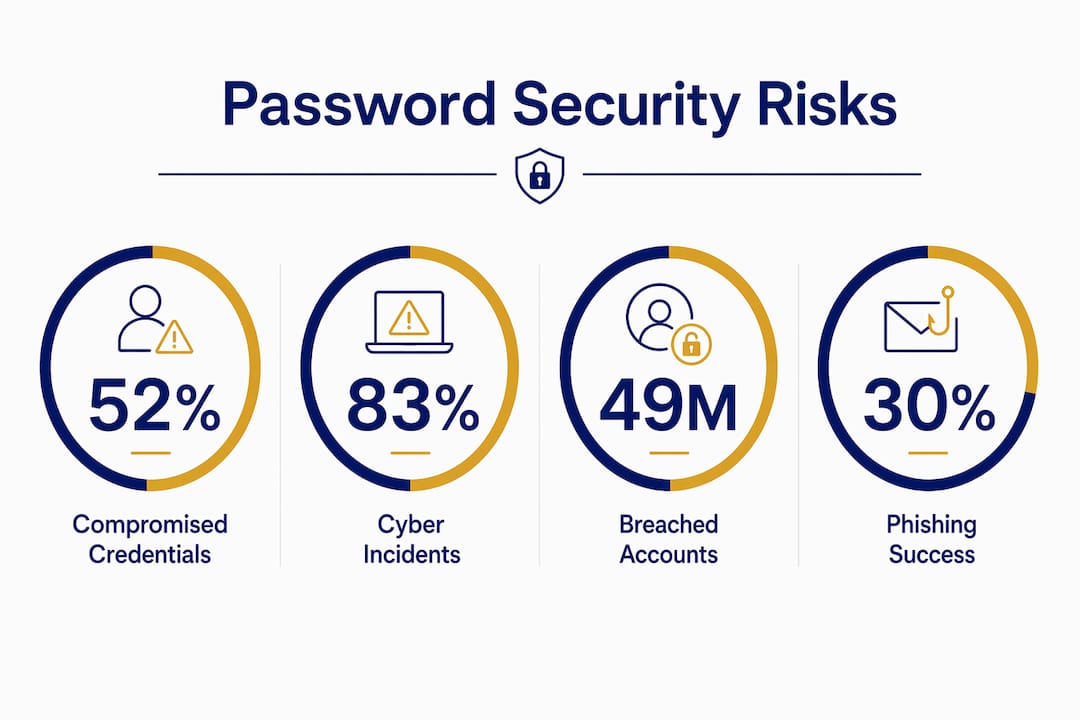
The scale in Australia is sobering. Since 2004, Australia has had 192.5 million breached accounts, with over 49 million unique Australian email addresses exposed and 106.9 million passwords leaked alongside other personal details. Those credentials do not disappear — they circulate on dark web markets for years, ready for replay attacks against banking portals, school systems, and government services.
The UK’s National Cyber Security Centre put it plainly: passkeys shift the burden of security from the user to the device, making phishing far less effective. Passwords ask humans to do something humans are bad at. Passkeys ask a device to do something devices do reliably.
Pro Tip: Stop rotating passwords on a schedule — it encourages weaker choices. Instead, use a password manager to generate a unique passphrase for every account and change credentials only when a breach is confirmed.
What can actually go wrong — and what it costs Australians
The consequences of weak credential practices are not abstract. For families, the most common outcomes are account takeover, identity theft, and financial fraud. For schools, a single compromised staff account can expose student records, triggering obligations under the Privacy Act and OAIC notifiable data breach reporting requirements. For SMEs, the damage extends to operational downtime, reputational harm, and regulatory scrutiny.

Compromised credentials drove between 52% and 83% of all cyber incidents in Australia in the first half of 2023, according to grouped OAIC reporting data. Brute-force attacks alone affected an average of 1,667,293 individuals per incident — a figure that puts the human cost well beyond the organisation that was breached.
The iiNet breach is instructive. Attackers used a single employee’s stolen credentials to access an order management system, extracting around 280,000 active email addresses and 20,000 landline numbers. No sophisticated exploit — just one reused or phished password.
Modern attacks that make passwords even less safe
Understanding how attackers operate changes which defences you prioritise. The most common techniques targeting Australians right now:
Phishing: A fake login page captures your username and password in real time. Even a strong password is useless if you type it into the wrong site.
Credential stuffing: Attackers take leaked username/password pairs and try them automatically across hundreds of services. Reuse is the vulnerability.
Adversary-in-the-middle (AiTM): A proxy site sits between you and the real service, capturing both your credentials and your MFA token. Push-notification MFA and SMS codes can be bypassed this way.
SIM swap: Attackers convince a telco to transfer your number to their SIM, intercepting SMS codes. Australian telcos have been targeted repeatedly.
Prompt-bombing: Attackers flood an MFA app with approval requests, hoping a fatigued user taps “approve” to make it stop.
Attackers also curate geographically targeted credential databases. AU_URLLOGINPASS-style stealer logs pair plaintext passwords with specific Australian banking, utility, and government portal URLs — purpose-built for local account takeover.
The implication is clear: SMS and TOTP codes are no longer sufficient for high-risk accounts. Privileged accounts, admin access, and internet-facing systems need phishing-resistant authentication first.
Practical controls for families and individual users
The importance of password security becomes real when you have a concrete list of what to do. Start with the highest-impact actions:
Enable passkeys on your email, banking, and social media accounts. Apple, Google, and Microsoft all support them natively. Cyber.gov.au recommends disabling the password fallback once a passkey is created.
Install a password manager. Bitwarden is free and open-source; 1Password and Dashlane offer family plans. Every account gets a unique, randomly generated credential.
Apply phishing-resistant MFA (a hardware security key like a YubiKey, or a FIDO2-compatible authenticator) to your most critical accounts. Avoid SMS codes for banking or email if the service offers a better option.
Keep devices updated. Passkeys live on your device — an unpatched phone or laptop is a vulnerability in the chain.
Use a PIN or biometric lock on every device. Avoid syncing passkeys to shared or untrusted devices.
For families with children or low-tech household members, reducing online risks starts with shared accounts managed through the password manager’s family vault. Teach children that a passphrase (three or four unrelated words) is stronger than a short complex password, and that they should never share login details — even with friends.
Where passkeys are not yet available, strong unique passphrases stored in a password manager are the practical interim measure. Treat it as a transition, not a destination.
What schools and businesses should implement
Organisational password security is as much a culture problem as a technical one. Security culture consistently lags tool deployment — organisations roll out MFA or password policies, then find staff still reuse credentials or share admin accounts.
Policy checklist for schools and SMEs:
Mandate a password manager for all staff accounts; include onboarding training
Enable passkeys on priority services via your identity provider (Microsoft Entra, Google Workspace, Okta)
Restrict shared and delegated accounts; log access and rotate credentials on staff departure
Apply phishing-resistant MFA to all privileged and internet-facing accounts
Document a recovery path for lost devices (who to call, how to revoke credentials)
For Essential Eight alignment, maturity levels 2 and 3 expect phishing-resistant MFA — FIDO2/passkeys or hardware security keys — for privileged and internet-facing accounts. SMS MFA does not meet that bar. Schools handling student data and SMEs in regulated sectors should treat this as a compliance baseline, not an aspiration.
Measure adoption, not just deployment. Track passkey enrolment rates, password manager uptake, and phishing simulation click rates. A security awareness campaign that reports on these numbers monthly keeps leadership informed and staff accountable.
Pro Tip: Run a phishing simulation before and after training. The before-and-after click rate is the single most persuasive metric for school leadership and SME boards when justifying ongoing investment.
Your 30/60/90-day rollout plan
30 days — quick wins (low cost, 2–5 hours of IT time):
Audit all staff accounts; identify those without MFA
Deploy a password manager organisation-wide (most tools offer free tiers for small teams)
Enable passkeys on priority services: email, cloud storage, finance platforms
Patch all internet-facing devices and disable default admin credentials
60 days — expand and train (low-to-medium investment, 1–2 days of staff time):
Replace SMS MFA with FIDO2/passkeys on high-risk accounts
Run a 30-minute staff training session on passkeys and phishing recognition
Update delegated and shared account policies; assign named owners
Procure hardware security keys for IT administrators and senior staff
90 days — audit, simulate, and embed (medium investment, ongoing):
Run a phishing simulation and review click rates against your 30-day baseline
Audit passkey and password manager enrolment; follow up with non-adopters
Document an incident response playbook covering lost devices and credential compromise
Set quarterly review dates for policy and tool updates
Who to involve: IT lead or managed service provider, school principal or SME owner, admin staff who manage shared accounts, and (for schools) a parent representative for family-facing communications. For technical staff seeking to deepen their credentials, CompTIA Security+ provides a solid grounding in authentication and identity concepts.
Building password security into your everyday culture
Tools without culture work fail. The research is consistent on this: measurable adoption targets, clear recovery plans, and behavioural interventions are what separate brittle implementations from lasting ones.
Practical ways to sustain the gains:
Send short monthly reminders (one tip, one action, under 60 seconds to read) rather than annual compliance lectures
Frame security as care, not compliance — “we protect each other’s data” lands differently than “you must follow policy”
Celebrate milestones: 100% password manager enrolment, first month with zero phishing clicks
Use the role of communication in cybersecurity to reduce security fatigue through positive, consistent messaging
Metrics worth tracking monthly:
Passkey adoption rate (% of staff/students enrolled)
Password manager enrolment (% of accounts covered)
Phishing simulation click rate (target: below 5% after three months of training)
Helpdesk tickets related to credential issues (a falling number signals genuine adoption)
A school that shifts from annual cyber awareness days to weekly micro-nudges — a tip in the staff newsletter, a student poster competition, a parent webinar — typically sees phishing click rates fall within two to three months. The technology is the scaffold; the culture is what holds it up.
Key takeaways
Passwords remain the leading cause of cyber incidents in Australia, and the most effective response combines passkeys, password managers, and phishing-resistant MFA with a culture that makes good habits the path of least resistance.
Point | Details |
Credentials drive most breaches | The majority of Australian cyber incidents in the first half of 2023 involved compromised credentials. |
Passkeys are the priority upgrade | Passkeys are phishing-resistant by design; enable them on email, banking, and cloud accounts first. |
Password managers solve the memory problem | A password manager generates and stores unique credentials, eliminating the reuse that makes credential stuffing possible. |
Essential Eight sets the MFA bar | ASD maturity levels 2–3 require phishing-resistant MFA (FIDO2/passkeys or hardware keys) for privileged accounts. |
Cybercompassconsulting supports the full journey | Cybercompassconsulting offers structured cyber wellness programmes for families, schools, and SMEs, covering both technical rollout and behavioural culture change. |
A note on what actually changes behaviour
There is something that bothers me about how password security is usually taught: it leads with fear and ends with a policy document. Tick the compliance box, move on. But fear fades, and policy documents gather dust.
What actually changes behaviour is repetition, relevance, and a sense of shared responsibility. The families and schools I have seen make real progress are not the ones who ran a single cyber awareness day — they are the ones who made digital safety a normal part of how they talk about looking after each other. A parent who explains passkeys to their teenager at the dinner table is doing more lasting security work than a 90-minute staff training that nobody remembers by Friday.
The technical controls in this guide are real and necessary. But they are scaffolding. The culture you build around them is what makes the difference between a one-off project and a genuinely safer community.
How Cybercompassconsulting can help your family, school, or business
Cybercompassconsulting works with Australian families, schools, and SMEs to build cyber wellness from the inside out — not just deploying tools, but changing the habits and culture that determine whether those tools actually get used.
For schools, the Cyber Wellness School Programme offers virtual consultations that fit around the school calendar, covering student awareness, staff training, and parent engagement in one structured plan. For SMEs, the Build a Cyber Wellness Plan service walks you through assessment, a practical rollout roadmap, and ongoing coaching — so you are not left with a report and no idea what to do next. Families can access personalised coaching through the Families programme, designed for households at every level of technical confidence.
Book a consultation to get a clear picture of where your biggest risks are and what to fix first.
Useful Australian resources and further reading
cyber.gov.au — Passkeys: The Australian Government’s practical guide to enabling passkeys, including advice on disabling password fallback and managing recovery. Start here for any passkey rollout.
Essential Eight Maturity Model FAQ — cyber.gov.au: The ASD’s authoritative reference for MFA and access control requirements at each maturity level. Use this to align your organisation’s controls with government expectations.
OAIC — Notifiable Data Breaches: The Office of the Australian Information Commissioner’s guidance on when and how to report a breach. Schools and SMEs handling personal data should review their reporting obligations here.
eSafety Commissioner: Australia’s online safety regulator offers resources for schools, families, and young people on digital safety, including reporting tools for serious online harms.
ASD/ACSC — cyber.gov.au: The Australian Signals Directorate’s public-facing hub for threat advisories, incident reporting, and practical security guidance for individuals and organisations.
Recommended
Comments